Creating high-quality content is only one part of a successful SEO strategy. For your pages to attract organic traffic, search engines must first discover, crawl, and understand them. If an important page is disconnected from your website’s internal linking structure, it may never reach its full ranking potential. This issue is known as an orphan page.
Orphan pages are one of the most overlooked technical SEO problems. They often remain unnoticed during routine website management, yet they can significantly affect crawlability, indexing, user experience, and search rankings. Even valuable content can stay hidden if users and search engines cannot easily access it.
In this guide, you’ll learn what orphan pages are, why they are considered a silent SEO mistake, how they affect your website, and the best practices to identify, fix, and prevent them.
What Are Orphan Pages?
An orphan page is a webpage that has no internal links pointing to it from any other page on the same website. Although the page exists and has its own URL, it is isolated from the rest of the site’s navigation and internal linking structure.
Search engines primarily discover new content by following internal links. When a page has no internal links, crawlers may struggle to find it, making it less likely to be crawled, indexed, or ranked.
Unlike a regular webpage that users can reach through menus, categories, or related articles, an orphan page is essentially hidden unless someone knows the exact URL.
Example
Suppose you publish a blog titled “10 Tips to Improve Website Speed.” After publishing, you forget to link it from your blog archive, homepage, category page, or related articles. The page is live, but since nothing on your website points to it, it becomes an orphan page.
Why Orphan Pages Are a Silent SEO Mistake
Orphan pages are called a silent SEO mistake because they often go unnoticed. Unlike broken links or 404 errors, orphan pages usually don’t display visible problems, making them difficult to detect without a technical SEO audit.
Valuable Content Becomes Invisible
You may invest time researching keywords, writing quality content, and optimizing on-page SEO. However, if no internal links lead to that content, search engines and users may never discover it.
They Waste SEO Efforts
Publishing valuable content without connecting it to your website’s structure reduces its chances of contributing to your overall SEO strategy. The page exists but fails to generate the visibility and traffic it deserves.
They Affect Overall Website Performance
A website with many orphan pages often has weak internal linking and poor site architecture. This makes it harder for search engines to understand your content hierarchy and topical relevance.
How Orphan Pages Affect SEO
Orphan pages impact several important areas of technical SEO.
Reduced Crawlability
Search engine bots navigate websites by following internal links. If no internal links point to a page, crawlers may discover it less frequently or not at all.
As a result, new content may take longer to appear in search results.
Delayed or Missed Indexing
Even if an orphan page appears in your XML sitemap, Google may not prioritize crawling and indexing it. Some pages may remain unindexed for extended periods.
Without proper indexing, a page cannot compete in search results.
Lower Search Rankings
Internal links help distribute authority across a website. Pages that receive internal links benefit from stronger signals about their importance.
Orphan pages receive little or no internal link equity, making it more difficult for them to rank against competing content.
Weak Topical Authority
Search engines use internal links to understand relationships between pages.
For example, if several articles about technical SEO link to one another, Google recognizes that they belong to the same topic cluster.
Orphan pages break this relationship and reduce the overall topical relevance of your website.
Poor User Experience
Users rely on navigation menus, categories, and related content to discover information.
When important pages are disconnected, visitors may never find useful resources, leading to missed engagement opportunities.
Lost Organic Traffic
Hidden pages rarely receive consistent organic traffic because search engines cannot fully understand or prioritize them.
Over time, this results in lost visibility, fewer visitors, and reduced conversions.
Common Causes of Orphan Pages
Several situations can unintentionally create orphan pages.
Website Redesigns
During a redesign, navigation menus and category structures often change.
If existing pages are not properly linked in the new design, they become orphaned.
Content Migration
Moving a website to a new domain or content management system can break internal links if migrations are not carefully planned.
Deleted Internal Links
Removing older blog posts, categories, or navigation links may accidentally disconnect important pages.
Marketing Landing Pages
Businesses often create dedicated landing pages for advertising campaigns.
Once the campaign ends, these pages may remain published without being connected to the main website.
Product Page Changes
E-commerce websites frequently discontinue products or reorganize categories.
If products are removed from categories without adding alternative links, those pages become orphaned.
Publishing Mistakes
Sometimes new pages are simply published without being linked from anywhere else on the website.
Poor Website Planning
A weak site architecture increases the chances of isolated pages that search engines struggle to discover.
How to Identify Orphan Pages
Finding orphan pages requires more than simply browsing your website.
Crawl Your Website
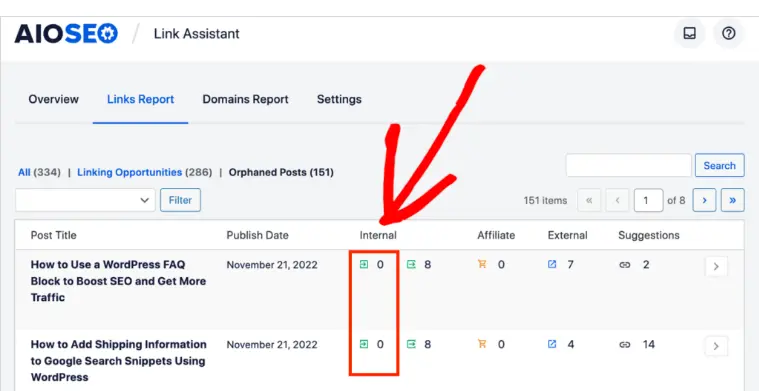
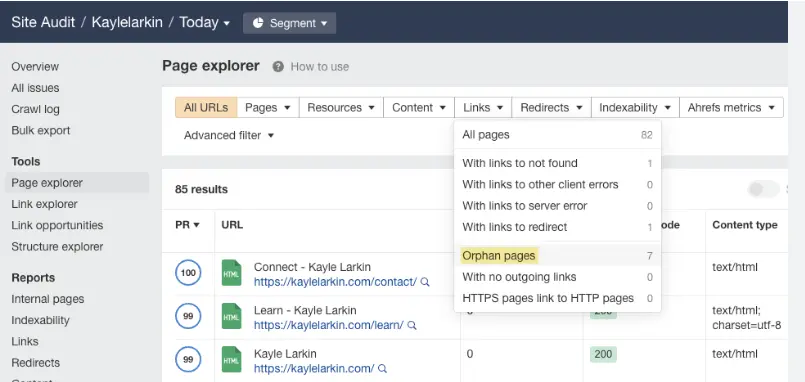
Website crawling tools scan your site’s internal linking structure and identify pages that lack incoming internal links.
Compare Crawl Data with Your XML Sitemap
If a page appears in the XML sitemap but not during the crawl, it could be an orphan page.
This comparison is one of the most effective ways to identify disconnected content.
Use Google Search Console
Google Search Console provides valuable insights into indexed pages and crawl status.
Pages receiving little visibility despite being indexed may require further investigation.
Review Website Analytics
Pages with almost no visits or internal referrals may indicate poor discoverability.
Analytics data can help identify pages that deserve stronger internal linking.
Conduct Regular SEO Audits
A complete technical SEO audit helps uncover orphan pages before they negatively affect search performance.
How to Fix Orphan Pages
Fortunately, orphan pages are relatively easy to fix once identified.
Add Relevant Internal Links
Link orphan pages naturally from related blog posts, category pages, service pages, or product pages.
Contextual internal links help search engines understand the relationship between content.
Connect Pages to Topic Clusters
Group related content around a central topic.
Each supporting article should link to the main pillar page while also linking to other relevant resources.
Include Important Pages in Navigation
If the page provides valuable information, consider adding it to your navigation menu, sidebar, or footer.
This improves both discoverability and user experience.
Update Existing Articles
Older content often provides excellent opportunities to add links to orphan pages.
Refreshing existing articles also improves content quality.
Improve Website Structure
Create logical categories and organize content into a clear hierarchy.
A well-structured website helps users and search engines navigate efficiently.
Redirect or Remove Low-Value Pages
Not every orphan page should remain online.
If the content is outdated, duplicate, or no longer useful, redirect it to a relevant page or remove it entirely.
Update Your XML Sitemap
Ensure all valuable pages are included in your XML sitemap to help search engines discover them.
However, remember that an XML sitemap should not replace a strong internal linking strategy.
Tools That Help Detect Orphan Pages
Several SEO tools make it easier to identify and manage orphan pages.
- Google Search Console – Monitors indexing status and page visibility.
- Screaming Frog SEO Spider – Crawls your website and identifies pages with no incoming internal links.
- Ahrefs Site Audit – Detects orphan pages and provides recommendations for improving internal linking.
- Semrush Site Audit – Highlights technical SEO issues, including orphaned content.
- Sitebulb – Offers visual reports of your website structure, making orphan pages easy to identify.
Using these tools regularly helps maintain a healthy and well-connected website.
Best Practices to Prevent Orphan Pages
Preventing orphan pages is much easier than fixing them later.
Create an Internal Linking Plan
Before publishing new content, decide where it will receive internal links from.
Build Topic Clusters
Organize related content into connected topic clusters to strengthen topical authority.
Review Internal Links Regularly
Audit your website every few months to ensure all important pages remain connected.
Check Your Website After Redesigns
Major updates often create orphan pages unintentionally.
Always verify your internal linking structure after launching a new design.
Monitor Marketing Pages
Review campaign landing pages once promotions end.
Either integrate them into your website or remove them if they are no longer useful.
Keep Important Pages Close to the Homepage
Key pages should generally be accessible within three clicks from the homepage.
Perform Technical SEO Audits
Routine SEO audits help detect orphan pages, broken links, and other technical issues before they affect rankings.
Common Mistakes to Avoid
Avoid these common errors that often create orphan pages:
- Publishing pages without adding internal links.
- Depending only on XML sitemaps for page discovery.
- Forgetting to update navigation after website redesigns.
- Ignoring old blog posts during content updates.
- Leaving campaign landing pages disconnected.
- Skipping regular technical SEO audits.
- Removing categories without updating linked pages.
Conclusion
Orphan pages are one of the most common yet overlooked technical SEO issues. Although they may contain valuable content, their lack of internal links makes them difficult for search engines and users to discover. This can lead to reduced crawlability, delayed indexing, weaker rankings, and missed opportunities to attract organic traffic.
The good news is that orphan pages are preventable. By building a logical website structure, maintaining a strong internal linking strategy, and performing regular technical SEO audits, you can ensure that every important page is accessible and contributes to your site’s overall performance. A well-connected website not only improves search engine visibility but also creates a smoother, more engaging experience for your visitors.

