Crawling, indexing, and ranking are the three main steps search engines follow to discover, understand, and show webpages in search results. Crawling helps search engines find pages, indexing stores and understands their content, and ranking determines their position for relevant searches.
These three processes are important for Search Engine Optimization because a webpage must be discovered and indexed before it can appear in search results. Understanding how they work helps website owners find SEO issues, improve website visibility, and create better opportunities to attract organic traffic.
This process continues as search engines regularly revisit webpages and update their understanding of the content. In this guide, we will explain crawling, indexing, and ranking, how they work together, common issues that can affect them, and simple SEO / GEO practices to improve your website’s search visibility.
What Is Website Crawling?
Website crawling is the process by which search engine bots, also known as web crawlers or spiders, discover and access webpages across the internet. Google’s crawler, called Googlebot, continuously scans websites to find new pages and updates to existing ones.
Googlebot discovers webpages through several methods, including:
- Internal links between pages
- Backlinks from other websites
- XML sitemaps
- Previously indexed pages
- URLs submitted through Google Search Console
When Googlebot visits a page, it reads the content, analyzes links, and collects information about the page. Crawling is the first step in the SEO process because search engines must first discover a page before deciding whether it should be indexed.
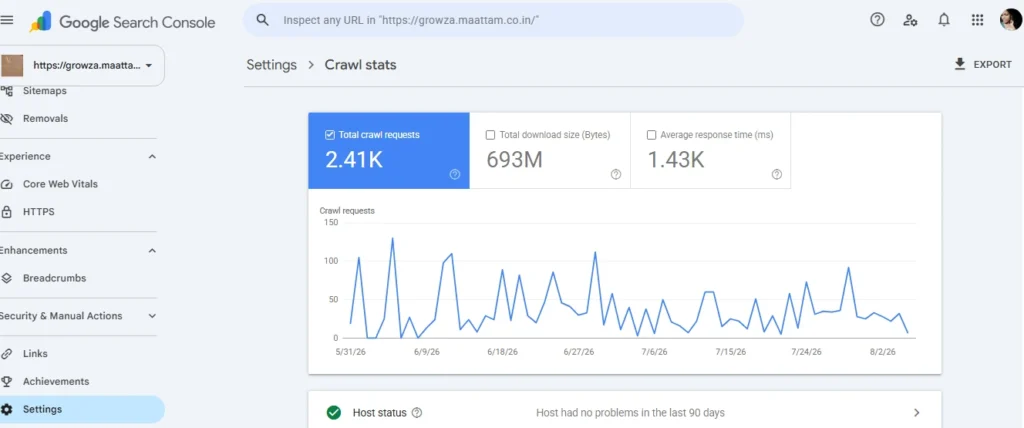
Google Search Console shows 2.41K crawl requests for the website, indicating that Google regularly visits its pages.
Regular crawling is important because it helps search engines discover updated and new content for indexing and ranking.
What Is Website Indexing?
Website indexing is the process of storing and organizing crawled webpages in a search engine’s database. After Googlebot crawls a page, Google evaluates its content, quality, relevance, and technical signals before deciding whether to include it in its index.
An indexed page becomes eligible to appear in search results when users search for related topics. However, being indexed does not guarantee high rankings. Google still evaluates hundreds of ranking factors to determine where the page should appear.
It’s important to remember that not every crawled page gets indexed. Pages with thin content, duplicate information, or technical issues may be excluded from Google’s index.
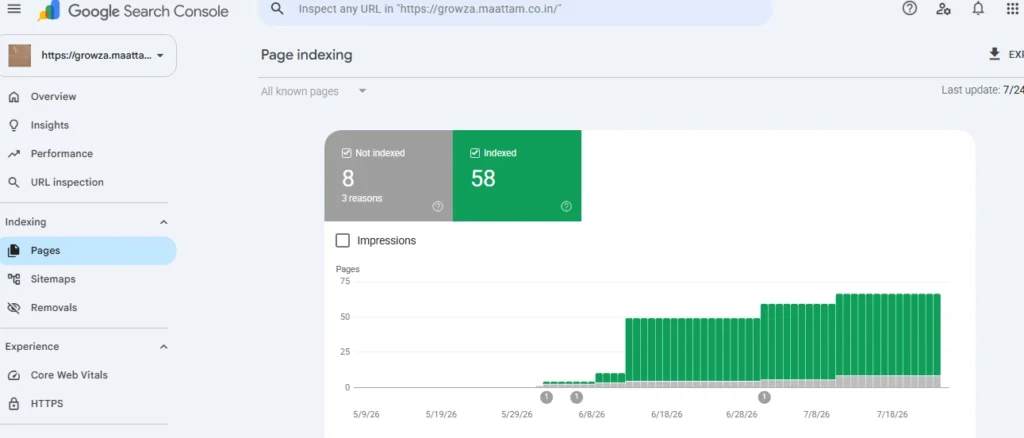
Google Search Console shows 58 pages indexed on the website, while 8 pages are not indexed for specific reasons. This report helps us understand how Google crawls and indexes the website and identifies areas that may need SEO improvements.
What Is Website Ranking?
Website ranking refers to the position of a webpage in search engine results for a specific search query or keyword. When users search on Google or another search engine, the pages are ordered based on their relevance, content quality, authority, user experience, and other ranking signals.
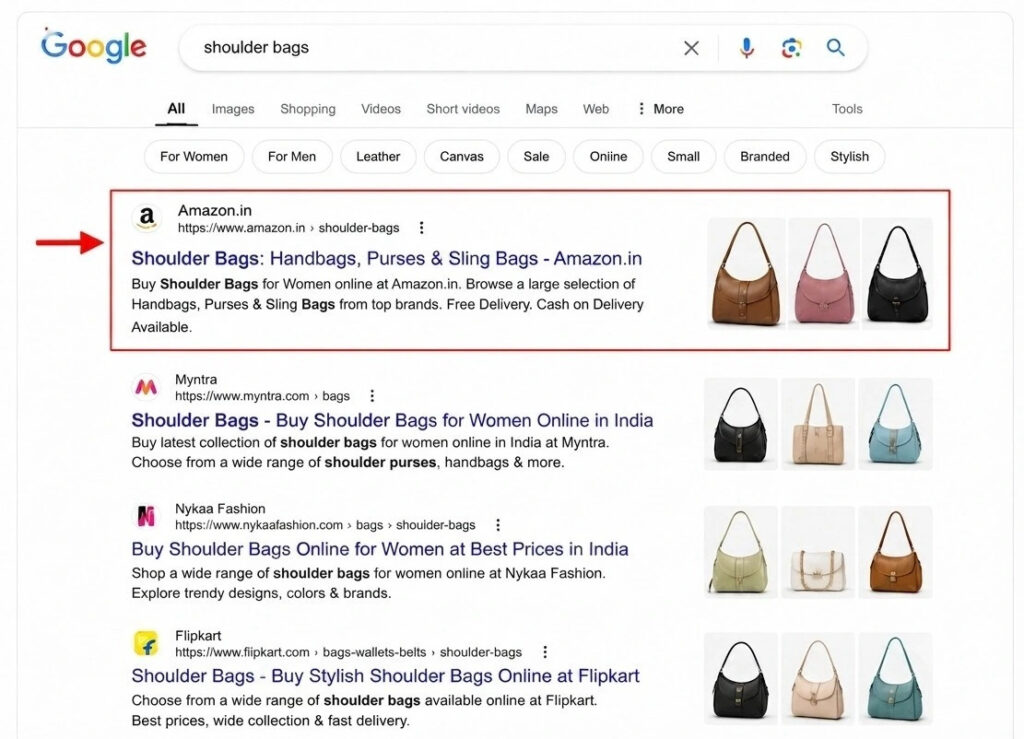
The image shows “shoulder bags” ranking in Google search results, with Amazon appearing in the top position.
A higher ranking is important because it increases visibility, attracts more clicks, and can bring more potential customers to the website.
Website Crawling vs Indexing vs Ranking
Although these terms are often used together, they represent different stages of the SEO process.
| Crawling | Indexing | Ranking |
| The process of discovering and accessing webpages. | The process of analyzing and storing webpages in a search engine’s index. | The process of determining a webpage’s position in search results. |
| Performed by search engine crawlers such as Googlebot. | Search engines process the information collected during crawling. | Search engines evaluate indexed pages based on multiple ranking signals. |
| Focuses on finding and accessing pages. | Focuses on understanding and organizing page content. | Focuses on ordering relevant pages for a search query. |
| Robots.txt, XML sitemaps, and internal links influence crawling. | Content quality, canonical tags, and no index directives influence indexing. | Relevance, search intent, content quality, backlinks, and page experience influence rankings. |
| A page must generally be accessible for search engines to crawl it. | A crawled page is not automatically indexed. | An indexed page is not guaranteed to rank highly. |
| Example: Googlebot discovers a new blog post. | Example: Google processes and adds the blog post to its index. | Example: Google places the blog post at #3 for a relevant search query. |
| Goal: Help search engines discover pages. | Goal: Make useful pages available in the search index. | Goal: Show the most relevant pages in prominent search positions. |
Factors That Affect Website Crawling
Several technical elements influence how efficiently search engines crawl your website.
Robots.txt
The robots.txt file tells search engine bots which pages or directories they can or cannot crawl. A misconfigured robots.txt file may accidentally block important pages from being discovered.
XML Sitemap
An XML sitemap lists important pages on your website and helps search engines discover new or updated content more efficiently. While it doesn’t guarantee indexing, it improves crawl efficiency.
Internal Linking
Internal links guide search engine crawlers from one page to another. Pages with few or no internal links, often called orphan pages, are much harder for search engines to discover.
Website Speed
Fast-loading websites allow crawlers to process more pages during each visit. Slow websites may reduce crawl efficiency, especially for large websites.
Server Errors
Frequent server issues such as 404 Not Found, 500 Internal Server Error, or DNS problems can prevent Googlebot from accessing your pages.
Factors That Affect Website Indexing
Crawling alone doesn’t ensure that a page will be indexed. Google also evaluates several quality and technical factors.
Duplicate Content
When multiple pages contain similar content, Google may choose only one version to index. Using canonical tags helps indicate the preferred version of a page.
Noindex Tags
A no index meta tag explicitly instructs search engines not to include a page in their search index. This is useful for pages like thank-you pages or internal search results.
Page Experience
Mobile-friendly design, fast loading times, secure HTTPS connections, and strong Core Web Vitals contribute to better overall quality signals.
Crawl Budget
For large websites, Google allocates a limited amount of crawling resources. Optimizing crawl budget ensures that important pages receive priority.
Factors That Affect Website Ranking
Search Intent
Your content should match what users are looking for when they enter a search query. Content that satisfies search intent is more likely to perform well in search results.
Content Quality
Original, useful, accurate, and relevant content helps search engines understand the value of your webpage and its usefulness to users.
Backlinks
Backlinks from relevant and trustworthy websites can strengthen your website’s authority and support better search visibility.
Technical SEO
Factors such as website speed, mobile-friendliness, HTTPS, proper internal linking, XML sitemaps, and crawlability help search engines access and understand your website.
User Experience
A fast, easy-to-navigate, mobile-friendly website provides a better experience for visitors. Good page experience can support stronger organic search performance.
Common Crawling, Indexing, and Ranking Problems
Websites can face different technical and content issues that prevent pages from being discovered, indexed, or ranking well in search results. Some of the most common problems include:
1. Pages Blocked by Robots.txt
An incorrect robots.txt rule can prevent search engine crawlers from accessing important pages.
2. Noindex Tags
A no index tag tells search engines not to include a page in their index. An accidentally added no index tag can prevent an important page from appearing in search results.
3. Duplicate or Thin Content
Duplicate or low-value content may provide little unique value to users, making it difficult for pages to gain visibility in search results.
4. Poor Internal Linking
Pages with few or no internal links can be difficult for search engines to discover and understand, especially when they are isolated from the rest of the website.
5. Low-Quality or Irrelevant Content
Even when a page is crawled and indexed, it may rank poorly if the content does not satisfy search intent, lacks useful information, or is less relevant than competing pages.
How to Check If Google Has Crawled, Indexed, and Ranked Your Website
You can use Google Search Console and Google Search to understand whether your pages have been crawled, indexed, and are appearing in search results.
1. Use Google Search Console
Google Search Console provides useful reports for checking your website’s crawling and indexing status.
- Open the URL Inspection Tool and enter your webpage URL.
- Check whether Google has discovered and indexed the page.
- Review the Page Indexing report to identify indexed and excluded pages.
- Use the Crawl Stats report to understand how Googlebot crawls your website.
2. Use the site: Search Operator
Search Google using the operator site:
site:yourdomain.com
This can help you find pages from your website that Google has indexed.
3. Check Your Keyword Rankings
To understand whether your pages are ranking, use the Performance report in Google Search Console. It can show:
- Search queries
- Clicks
- Impressions
- Average position
- Click-through rate (CTR)
Best Practices to Improve Crawling, Indexing, and Ranking
Following good SEO practices helps search engines discover your pages, understand your content, and improve your chances of appearing higher in relevant search results.
1. Create an XML Sitemap
Create and regularly update an XML sitemap to help search engines discover important pages on your website.
2. Optimize Robots.txt
Use the robots.txt file correctly to control crawler access. Avoid accidentally blocking important pages that you want search engines to crawl.
3. Improve Internal Linking
Add relevant internal links between your webpages. A strong internal linking structure helps search engines discover pages and understand the relationship between your content.
4. Publish High-Quality Content
Create original, useful, and relevant content that matches user search intent. Keep your content accurate and update it when information becomes outdated.
5. Fix Technical SEO & GEO Issues
Regularly check for broken links, duplicate pages, incorrect redirects, slow loading times, and mobile usability problems. A technically healthy website makes it easier for search engines to crawl, index, and evaluate your pages. A GEO expert can also help optimize content and technical signals for visibility across AI search and generative search experiences.
6. Build Relevant Backlinks
Earn quality backlinks from trustworthy and relevant websites. Strong backlinks can improve your website’s authority and support better search visibility.
7. Monitor Performance in Google Search Console
Regularly review indexing, crawling, and performance reports in Google Search Console. Identify problems early and make improvements based on your website’s search data.
Conclusion
Website crawling and indexing are the first two stages of the search engine optimization process. Crawling allows search engines to discover your webpages, while indexing determines whether those pages become eligible to appear in search results. Even the most informative content cannot rank if search engines cannot access or index it.
Regularly monitoring your website through Google Search Console, maintaining a well-structured XML sitemap, optimizing your robots.txt file, improving internal linking, and publishing high-quality content are all essential practices for successful technical SEO. By understanding and optimizing these processes, you can help search engines find, evaluate, and showcase your content to the right audience, ultimately improving your website’s visibility and organic performance.

