Google Search Console (GSC) is a free tool provided by Google for monitoring and improving a website’s presence in Google Search.It provides useful information about how Google discovers, crawls, and indexes your website.You can also use GSC to understand how your pages perform in organic search.Some of the important information available in Google Search Console includes:
- Search clicks
- Search impressions
- Click-through rate (CTR)
- Average position
- Search queries
- Top-performing pages
- Indexing issues
- Core Web Vitals
- Mobile usability
- Security issues
- Crawl activity
Therefore, GSC is an important tool for both SEO and website monitoring.In this complete Google Search Console guide, you will learn what GSC is, why it matters, how to set it up, how to analyze performance, and how to use it for SEO.
Who Should Use Google Search Console?
Google Search Console is useful for almost anyone who manages a website.
It can help:
- Beginners learning SEO
- Digital marketing students
- SEO professionals
- Website owners
- Business owners
- Developers
- Marketing teams
- Bloggers
You do not need advanced technical knowledge to start using it.
Beginners can use GSC to understand search performance.SEO professionals can use it for deeper analysis and technical troubleshooting.Developers can also use it to investigate crawling and indexing problems.
Why Is Google Search Console Important for SEO?
Google Search Console provides real search data about your website.This makes it valuable for making SEO decisions.Instead of guessing which keywords bring visitors, you can see actual queries that generated impressions and clicks.You can also identify pages that are performing well and pages that need improvement.
Monitor Organic Search Performance
One of the main benefits of GSC is performance monitoring.The Performance report provides four important metrics:
- Clicks
- Impressions
- CTR
- Average position
These metrics help you understand how your website performs in Google Search.For example, a page may receive thousands of impressions but only a small number of clicks.This could indicate an opportunity to improve its search result appearance.
Find SEO Opportunities
GSC can reveal valuable keyword opportunities.You can find:
- High-impression keywords
- Low-CTR queries
- Ranking opportunities
- New search queries
- Pages gaining visibility
- Pages losing visibility
For example, imagine that one of your pages ranks around position 8 for an important keyword.Improving the content, search intent, internal links, and page optimization may help the page move higher.These opportunities are often called striking-distance keywords.
Identify Technical SEO Problems
Google Search Console also helps identify technical SEO problems.You can use it to monitor:
- Indexing issues
- Crawling problems
- Core Web Vitals
- HTTPS issues
- Mobile usability
- Security problems
This makes GSC more than just a traffic reporting tool.
It can also help you understand why important pages may not appear correctly in Google Search.
Google Search Console Setup and Verification
Before using Google Search Console, you need to add your website and verify ownership.The setup process is straightforward.
Create or Access Google Search Console
First, sign in to Google Search Console using your Google account.
Next, add your website as a property.
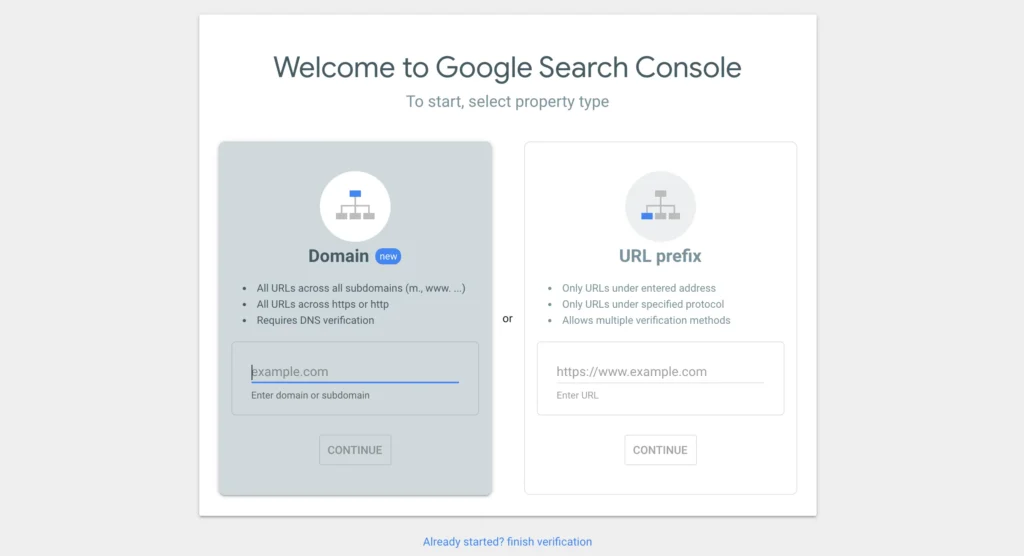
Google provides two main property options:
- Domain property
- URL-prefix property
Choose the option that best matches your website and tracking requirements.
Choose a Property Type
Understanding the difference between these property types is important.
Domain Property
A Domain property provides broad coverage for your website.
It can include:
- Different subdomains
- Different URL protocols
- Multiple variations of your website
For example, a Domain property can cover:
example.com
www.example.com
blog.example.com
It can also cover HTTP and HTTPS versions.
Domain properties generally require DNS verification.
URL-Prefix Property
A URL-prefix property tracks URLs that begin with a specific prefix.
For example:
This makes it more limited than a Domain property.
However, it provides several verification methods.
It can be useful when you only want to monitor a specific version or section of a website.
Google Search Console Verification Methods
After adding your property, you need to verify ownership.
Google provides several verification options.
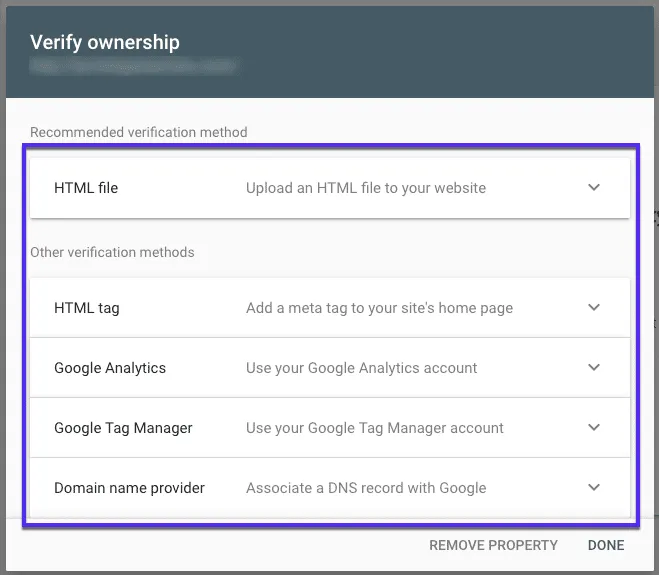
DNS Record Verification
DNS verification is commonly used for Domain properties.
You add a verification record to your domain’s DNS settings.
This confirms that you control the domain.
HTML File Upload
With this method, Google provides an HTML verification file.
You upload the file to your website’s root directory.
Google then checks whether the file exists.
HTML Meta Tag
You can also verify a website by adding a specific meta tag to your homepage.
This method can be convenient for website owners who can edit their site’s HTML.
Google Analytics
If your website already uses Google Analytics with the required setup and permissions, Google Analytics may be available as a verification method.This can make verification easier.
Google Tag Manager
Google Tag Manager can also be used for verification when the required setup and permissions are available.Choose the verification method that works best with your website setup.
Submit Your XML Sitemap
An XML sitemap helps search engines discover important URLs on your website.After creating your sitemap, open the Sitemaps section in Google Search Console.Enter your sitemap URL and submit it.
A common sitemap address looks like:
After submission, GSC will display information about the sitemap and its status.
Remember that submitting a sitemap does not guarantee that every URL will be indexed.
Instead, it helps Google discover and understand important URLs on your website.
Link Google Analytics 4 With Search Console
You can also connect Google Search Console with Google Analytics 4 (GA4).
Both tools provide different types of information.
Google Search Console focuses heavily on Google Search performance.
GA4 provides broader information about website traffic and user behavior.
Together, they can help you understand the complete journey:
Search visibility → Website visit → User behavior
This combination can make your SEO analysis more useful.
Google Search Console Performance Report
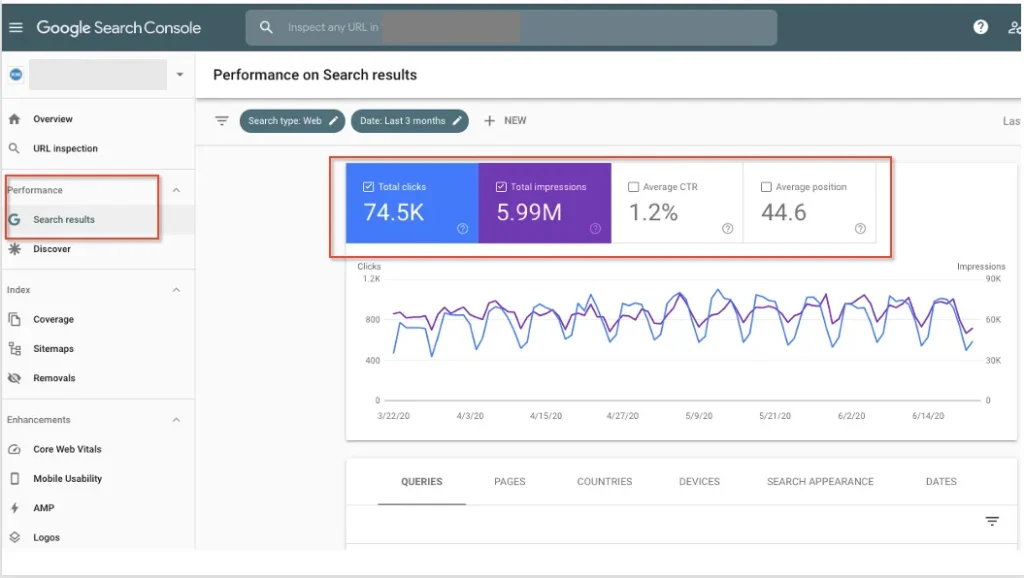
The Google Search Console Performance report is one of the most important sections for SEO.It helps you understand how your website performs in Google Search.
You can analyze your data using different dimensions, including:
- Queries
- Pages
- Countries
- Devices
- Search appearance
- Dates
Understanding these reports can help you identify what is working and where improvements are needed.
Core Performance Metrics
The Performance report provides four main metrics.
Total Clicks
Clicks represent the number of times users clicked your website from Google Search.
For example, if users clicked your website 500 times from Google Search, your website received 500 clicks during that selected period.
Tracking clicks helps you understand how much search traffic your website is receiving.
Total Impressions
Impressions represent the number of times your website appeared in Google Search results.
A page can receive many impressions even if it receives very few clicks.
This makes impressions useful for identifying visibility and keyword opportunities.
Average CTR
CTR, or Click-Through Rate, represents the percentage of impressions that resulted in clicks.
The formula is:
CTR = Clicks ÷ Impressions × 100
For example, if a page receives 1,000 impressions and 50 clicks:
CTR = 50 ÷ 1,000 × 100 = 5%
A low CTR may indicate that your search result needs improvement.
However, CTR can vary depending on the keyword, search position, search intent, and SERP features.
Average Position
Average position represents an aggregated view of where your website appeared in Google Search.It is useful for monitoring overall ranking trends.However, you should not treat it as an exact ranking position for every user.Search results can vary based on factors such as location, device, search context, and other signals.Therefore, use average position as a performance indicator rather than a fixed ranking number.
How to Analyze Search Console Performance Data
The Performance report becomes more useful when you know how to analyze its data.Instead of simply checking traffic numbers, look for patterns and opportunities.
Analyze Queries
The Queries section shows the search terms that generated impressions and clicks for your website.
You can use this data to discover:
- Ranking keywords
- High-performing search queries
- New keyword opportunities
- High-impression queries
- Low-CTR queries
For example, suppose a page receives 8,000 impressions for a keyword but only 120 clicks.This could indicate a CTR opportunity.You can review the page title, content, search intent, and overall search result appearance.You may also find keywords that you were not specifically targeting.These unexpected queries can provide ideas for new content or improvements.
Analyze Pages
The Pages section shows how individual URLs perform in Google Search.
You can identify:
- Top-performing pages
- Underperforming pages
- Pages gaining traffic
- Pages losing visibility
- Pages receiving high impressions
Suppose one blog post has consistently gained impressions.You could improve it with updated information, better internal links, and more relevant content.Similarly, a page losing clicks may need investigation.Check whether its rankings, impressions, CTR, content, or indexing status have changed.
Analyze Countries
Google Search Console can show performance by country.This is particularly useful for local SEO and international SEO.
You can compare:
- Clicks by country
- Impressions by country
- CTR by country
- Average position by country
For example, an international website may discover that its content performs strongly in India but receives limited visibility in another target market.
This information can help guide country-specific content strategies.
Analyze Devices
GSC allows you to compare performance across:
- Desktop
- Mobile
- Tablet
Device analysis can reveal differences in search behavior.For example, if mobile users generate most impressions but your mobile pages receive a lower CTR, you can investigate your mobile experience.This is especially important because many websites receive a large share of their traffic from smartphones.
Analyze Search Appearance
The Search Appearance section provides insights into how your pages appear in Google Search.
Depending on the website and eligible search features, you may see different search appearance categories.
This information can help you understand which search features generate visibility and clicks.
Google Search Console URL Inspection Tool
The Google Search Console URL Inspection tool helps you understand how Google sees a specific URL.It is useful when you publish new content, update important pages, or troubleshoot indexing problems.
Inspect a URL
To inspect a page, enter its URL into the inspection field.
GSC can provide information about:
- Whether the URL is indexed
- Whether Google can access the page
- Crawling information
- Canonical information
- Page experience and enhancements
- Indexing status
This makes URL Inspection an important part of technical SEO.
Request Indexing
The Request Indexing option allows you to ask Google to recrawl a URL.
It can be useful when:
- You publish a new important page
- You make major content updates
- You fix an indexing problem
- You update important information
However, requesting indexing does not guarantee immediate indexing.
You should also avoid repeatedly requesting indexing for the same URL without a valid reason.
Live URL Test
The Live Test checks the current version of a URL.It can help you understand whether Google can currently access the page.This is useful after making technical changes.
For example, imagine that a page previously had a server error.
After fixing the problem, you can use the Live Test to check the current version of the page.
Page Indexing Information
URL Inspection can help you determine whether Google has indexed a specific page.If the page is not indexed, GSC can provide information that helps you investigate the reason.
This is particularly useful for important:
- Product pages
- Service pages
- Category pages
- Blog posts
- Landing pages
Removals Tool
The Removals section allows website owners to request temporary removal of certain content from Google Search.This can be useful when sensitive or outdated content needs to be temporarily hidden.However, temporary removal is not the same as permanently preventing indexing.
For permanent control, you may need to use appropriate technical methods such as removing content or applying indexing directives.
Google Search Console Page Indexing
Indexing is one of the most important parts of SEO.A page generally needs to be indexed before it can appear in Google’s organic search results.The Page Indexing report helps you understand which URLs Google has indexed and which URLs are excluded.
Indexed Pages
An indexed page has been added to Google’s search index.
However, being indexed does not guarantee high rankings.
A page can be indexed and still receive very little organic traffic.
Therefore, indexing is only one part of SEO.
Not Indexed Pages
A URL may remain outside Google’s index for several reasons.
Some exclusions are completely normal.
For example, you may intentionally prevent certain pages from being indexed.
However, an important business page that is not indexed deserves investigation.
Common Indexing Problems
Some common indexing issues include:
noindex
A noindex directive tells search engines not to include a page in their index.
This can be useful for pages that should not appear in search.
However, accidentally adding noindex to an important page can prevent it from appearing in Google.
Redirects
Redirected URLs may not be indexed because Google is directed toward another URL.
This is normal in many situations.
However, incorrect redirects can create SEO problems.
Server Errors
Server errors can prevent Google from accessing a page.
Repeated errors should be investigated quickly, especially when they affect important URLs.
Duplicate Pages
Multiple URLs may contain identical or very similar content.
Google may choose one URL as the canonical version.
Therefore, not every duplicate URL needs to be indexed.
Canonical Issues
A canonical tag helps indicate the preferred version of similar pages.
Incorrect canonical settings can cause the wrong URL to be selected.
Crawled but Currently Not Indexed
Google may crawl a page but decide not to index it at that time.
This does not automatically mean there is a technical error.
Review the page’s quality, originality, usefulness, internal linking, and search intent before making changes.
Core Web Vitals in Google Search Console
Core Web Vitals measure important aspects of a website’s user experience.Google Search Console groups URLs based on their reported performance.The three current Core Web Vitals are:
- LCP
- INP
- CLS
LCP – Largest Contentful Paint
Largest Contentful Paint (LCP) measures loading performance.It focuses on how quickly the largest main content element becomes visible.A good loading experience helps users access important content faster.Large images, slow servers, and inefficient resources can contribute to poor loading performance.
INP – Interaction to Next Paint
Interaction to Next Paint (INP) measures how responsive a page is to user interactions.
For example, a user may:
- Click a button
- Open a menu
- Submit a form
- Interact with a navigation element
If the page responds slowly, the experience can feel frustrating.Developers can improve responsiveness by reducing unnecessary JavaScript work and optimizing page resources.
CLS – Cumulative Layout Shift
Cumulative Layout Shift (CLS) measures visual stability.A page has poor visual stability when elements unexpectedly move while the page loads.
For example, imagine trying to click a button.
An image suddenly loads above it.
The button moves down.
You accidentally click something else.
That is a poor user experience.
Stable layouts help users interact with pages more comfortably.
Why Core Web Vitals Matter
Core Web Vitals provide useful information about real-world page experience.However, SEO should not focus only on these metrics.Content quality, relevance, search intent, technical accessibility, and many other factors also matter.Use GSC to identify pages that need technical improvement, then work with developers to fix the underlying problems.
Mobile Usability and HTTPS
Mobile Usability
Mobile usability is important because many users access websites through smartphones.A website should work properly across different screen sizes.
Check for:
- Responsive design
- Readable text
- Easy navigation
- Properly sized buttons
- Usable forms
- Fast loading
- Accessible content
A poor mobile experience can make it difficult for visitors to read or interact with your website.Therefore, mobile SEO should be part of your overall optimization strategy.
HTTPS
HTTPS helps secure the connection between a user’s browser and your website.It protects information transferred between the browser and server.HTTPS also helps establish user trust.Website owners should ensure that important pages use HTTPS correctly.Also check for issues such as mixed content and incorrect redirects between HTTP and HTTPS versions.
Crawl Stats Report
The Crawl Stats report provides information about Google’s crawling activity on your website.
It is particularly useful for:
- Large websites
- Ecommerce websites
- News websites
- Enterprise websites
- Technical SEO professionals
The report can provide insights into:
- Googlebot activity
- Crawl requests
- Crawl response times
- Server responses
- Crawled URLs
Googlebot Activity
Googlebot is Google’s web crawler.Crawl data can help you understand how frequently Google accesses your website.
Crawl Requests
The report provides information about Google’s crawl requests.Unexpected changes can sometimes indicate technical issues or major website changes.
Response Times
Server response time is important for efficient crawling.If your server consistently responds slowly, it can create technical challenges, especially on large websites.
Server Response Issues
Crawl statistics can help identify server-related problems.For example, frequent server errors may prevent Google from successfully accessing important URLs.However, crawl rate alone should not be treated as an SEO score.The goal is to make important content accessible and technically healthy.
Conclusion
Google Search Console is an essential tool for anyone serious about SEO. It helps you understand how your website performs in Google Search and where improvements are needed.From search performance and keyword opportunities to indexing, Core Web Vitals, and technical SEO, GSC provides valuable insights for website optimization.
Start by verifying your website and submitting your sitemap. Then, regularly monitor your performance, inspect important URLs, check indexing issues, and review technical reports.Most importantly, do not just collect data. Use Google Search Console insights to make better SEO decisions and improve your website over time.

