Website speed plays an important role in user experience, search performance, and overall website success. When a page takes too long to load, visitors may leave before engaging with your content, products, or services. This makes website performance an important part of maintaining a fast and user-friendly website.
Google PageSpeed Insights helps you understand how well your website performs on both mobile and desktop devices. It provides performance scores, key metrics, and recommendations that show where your website needs improvement.
Improving these performance issues can help create a smoother browsing experience, reduce loading delays, and make your website more efficient. This article covers 10 effective ways to optimize your website using Google PageSpeed Insights, including image optimization, reducing unused code, improving server response time, and addressing Core Web Vitals.
What Is Google PageSpeed Insights?
Google PageSpeed Insights is a performance analysis tool that evaluates individual webpages and provides information about how they perform on different devices.
It provides both lab data and, when available, field data from real users. The report includes performance metrics, opportunities, and diagnostics that can help identify areas for improvement.
PageSpeed Insights is useful because it doesn’t simply tell you that a page is slow. It can also help you understand which resources or technical issues may be contributing to poor performance.
10 Ways to Improve Your PageSpeed Insights Score
1. Optimize and Compress Images
Images are usually the single biggest contributor to page weight, making this the first place to look for quick wins.
- Use modern formats (WebP/AVIF) : smaller file sizes at similar quality than JPEG/PNG.
- Compress images 50–80% : reduces file size with no noticeable quality loss.
- Use responsive images (srcset/sizes) : serves appropriately sized images per device instead of one large image for all.
- Enable lazy loading : loads below-the-fold images only as the user scrolls near them.
2. Minimize and Combine CSS and JavaScript Files
Every CSS and JavaScript file requires a separate network request, and unused code adds unnecessary weight.
- Minify code : strips whitespace/comments to shrink file size without changing functionality.
- Remove unused CSS/JS : eliminates dead code, old plugins, and unused libraries that add weight.
- Combine files strategically : reduces request overhead, though less critical with HTTP/2.
3. Leverage Browser Caching
Browser caching tells visitors’ browsers to store certain files locally so repeat visits load faster.
- Set Cache-Control headers : tells browsers to store static assets locally for faster repeat visits.
- Use a CDN : serves content from servers closer to visitors to cut latency.
4. Reduce Server Response Time (TTFB)
Time to First Byte (TTFB) measures how long it takes your server to respond to a request. A slow server undermines every other optimization.
- Upgrade hosting : moves off slow shared hosting to a VPS/dedicated/managed plan.
- Use server-side caching : tools like Redis or Varnish reduce database and generation load.
- Optimize the database : cleans up junk data and adds indexes for faster queries.
5. Eliminate Render-Blocking Resources
Render-blocking resources are CSS and JavaScript files that prevent the browser from displaying content until they’ve finished loading.
- Defer non-critical JavaScript : prevents scripts from blocking HTML parsing.
- Inline critical CSS : puts above-the-fold styles directly in the HTML head for faster rendering.
- Load CSS asynchronously : prevents non-critical stylesheets from blocking initial render.
6. Enable Text Compression (Gzip or Brotli)
Text-based files HTML, CSS, JavaScript, and JSON compress extremely well.
- Gzip compression : widely supported, can shrink files by up to 70%.
- Brotli compression : a newer algorithm that often beats Gzip on text-heavy files.
7. Optimize Web Fonts
Custom fonts are great for branding but can silently hurt performance if not handled carefully.
- Limit font variations : only load the weights/styles actually used, since each is a separate file.
- Use font-display swap : keeps text visible with a fallback font while the custom font loads.
- Preload key fonts : starts downloading fonts used in critical content as early as possible.
8. Minimize Third-Party Scripts
Analytics tools, chat widgets, ad scripts, and social media embeds often carry a heavy performance cost.
- Audit third-party tools : identifies which scripts slow the page down most.
- Load scripts asynchronously : stops third-party code from blocking page rendering.
- Remove unneeded tools : cut scripts that no longer justify their performance cost.
9. Implement Preconnect and Preload Hints
Resource hints tell the browser to prioritize certain connections and assets before they’re formally requested.
- Use preconnect for critical origins : start the connection handshake early for known external domains.
- Use preload for key assets : prioritizes downloading critical resources like hero images or fonts.
- Avoid overusing resource hints : too many can compete for bandwidth and hurt performance.
10. Fix Cumulative Layout Shift (CLS) Issues
Layout shifts happen when page elements move around as the page loads, and they’re a major source of poor Core Web Vitals scores.
- Set explicit dimensions for media : reserves space before images/videos load to prevent shifting.
- Reserve space for ads/embeds : stops dynamically loaded content from pushing existing content around.
- Avoid inserting content above existing content : prevents unexpected layout shifts unless user-triggered.
Why Is Page Speed Important for Your Website?
- Improves user experience: Visitors can access content and navigate faster.
- Reduces bounce rates: Faster pages reduce the chance of visitors leaving.
- Supports mobile users: Quick loading improves the experience on mobile devices.
- Improves responsiveness: Optimized websites respond faster to user actions.
- Supports Core Web Vitals: Good speed can improve metrics like LCP, INP, and CLS.
- Helps SEO: A fast, user-friendly website can support better search performance.
- Increases conversions: Faster pages can encourage users to purchase, sign up, or submit forms.
- Reduces data usage: Optimized pages use less data, benefiting users with slower connections.
- Reduces server load: Caching and optimized resources can reduce server workload.
- Creates a better website experience: Overall, page speed makes a website faster, smoother, and easier to use.
How to Check Your Website with PageSpeed Insights
Checking your website is the first step toward improving its performance.
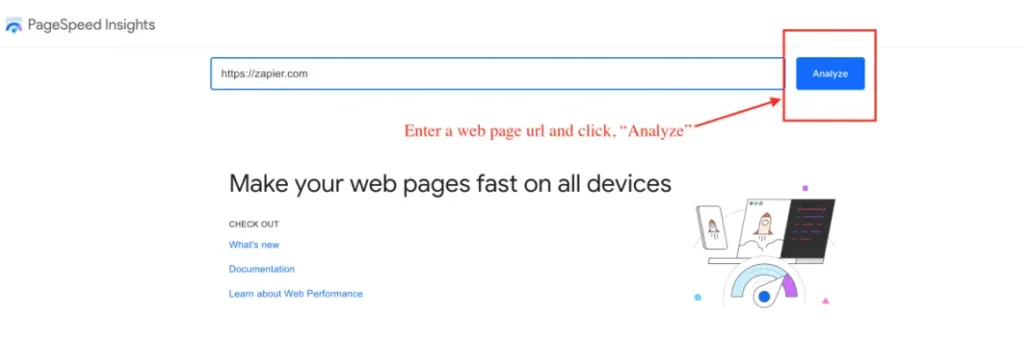
Enter the URL of the webpage you want to test and run the analysis. You can test your homepage, blog posts, landing pages, product pages, or other important URLs separately.
How to Run a PageSpeed Insights Test
Follow these basic steps:
- Open Google PageSpeed Insights.
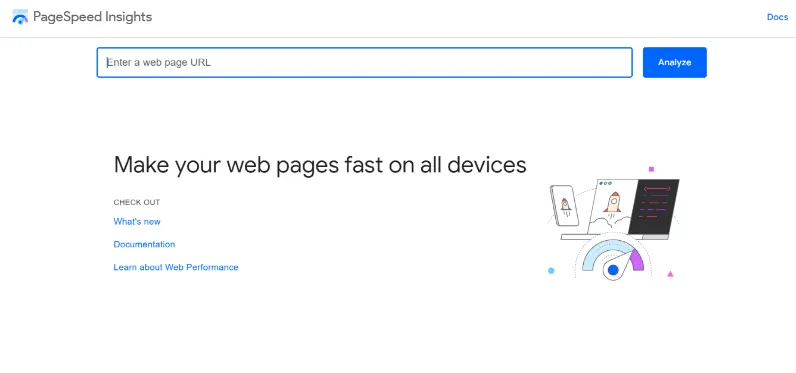
- Enter the URL of the webpage and Start the analysis.
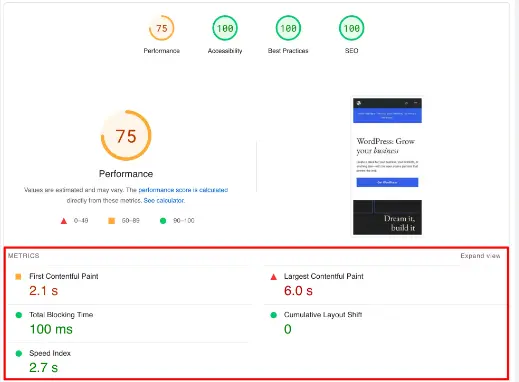
- Review the mobile results and the desktop results.

- Check the performance metrics.
- Review Opportunities and Diagnostics.
- Prioritize the most important issues.
Test important pages individually because performance can vary significantly from one page to another.
PageSpeed Insights Performance Metrics
Google PageSpeed Insights uses several performance metrics to measure different aspects of a website’s loading experience
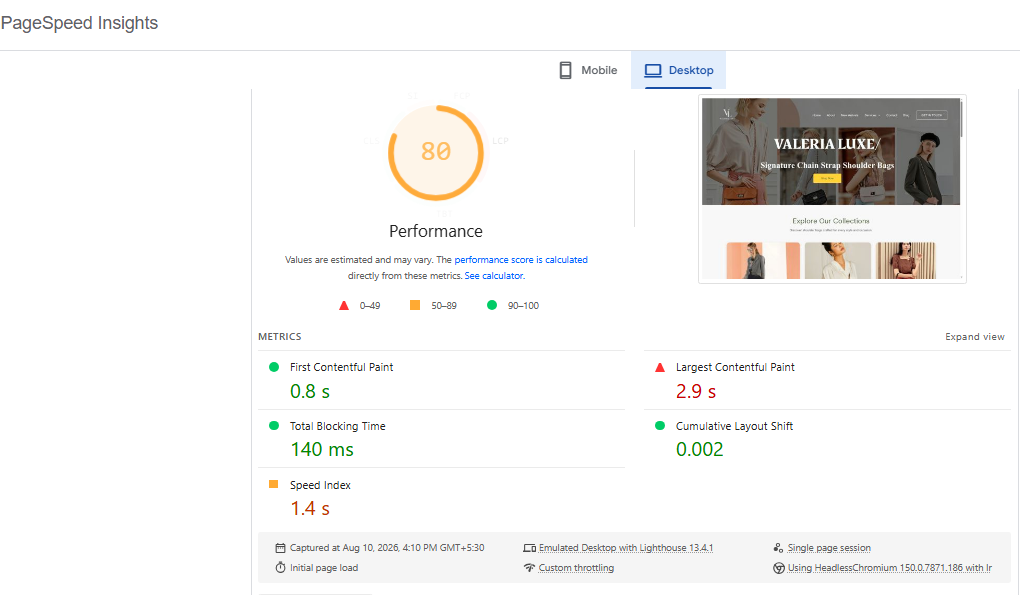
The image below illustrates these metrics and their results, helping you understand how PageSpeed Insights evaluates website performance. Each metric focuses on a specific area, such as how quickly content appears, how fast the main content loads, how responsive the page is, and how stable the layout remains. Understanding these metrics makes it easier to identify performance issues and choose the right optimization strategies.
1. First Contentful Paint (FCP)
First Contentful Paint (FCP) measures how quickly the first visible content appears on the user’s screen. It can be text, an image, a logo, or another visible element. FCP is important because it tells users that the webpage has started loading and is responding. A faster FCP creates a better first impression because visitors do not have to stare at a blank screen.
Example: In the shown report, the Valeria Luxe website has an FCP of 0.8 seconds, meaning the first visible content appears after about 0.8 seconds. This is a good result, as the recommended FCP is 1.8 seconds or less.
2. Largest Contentful Paint (LCP)
Largest Contentful Paint (LCP) measures how quickly the largest visible content element appears on the screen. This is commonly a large image, banner, heading, or main content section. LCP is important because it shows when the primary content of a page becomes visible to the visitor. Large images, slow servers, and render-blocking resources can make LCP slower.
Example: In the report, the Valeria Luxe website has an LCP of 2.9 seconds. This means the main content takes about 2.9 seconds to appear. It needs improvement, because a good LCP should be 2.5 seconds or less.
3. Total Blocking Time (TBT)
Total Blocking Time (TBT) measures how long the browser’s main thread is blocked by long-running tasks while the page is loading. When the main thread is busy, the browser may not respond quickly to user actions. Heavy JavaScript, third-party scripts, and large tasks are common causes of high TBT. Reducing unnecessary JavaScript can help the browser become available for user interactions sooner.
Example: The report shows a TBT of 140 ms for the Valeria Luxe website. This is a good result, because the recommended TBT is 200 ms or less.
4. Cumulative Layout Shift (CLS)
Cumulative Layout Shift (CLS) measures unexpected movement of page elements while the webpage is loading. A good webpage should remain visually stable so users can read and interact with content without elements suddenly moving. Images without defined dimensions, advertisements, fonts, and dynamically inserted content can cause layout shifts. A high CLS can make users accidentally click the wrong button or lose their place while reading.
Example: The Valeria Luxe website has a CLS of 0.002 in the report. This is an excellent result, because a good CLS should be 0.1 or less.
5. Speed Index
Speed Index measures how quickly the visible content of a webpage becomes populated during loading. It focuses on the visual progress of the page rather than simply measuring when the entire page has finished loading. A faster Speed Index means visitors can see useful parts of the webpage sooner. Large images, render-blocking resources, and poorly prioritized content can make the Speed Index slower.
Example: The report shows a Speed Index of 1.4 seconds for the Valeria Luxe website. This is a good result, as a Speed Index of 3.4 seconds or less is generally considered good.
| Metric | What It Measures | Recommended Measure |
| FCP | How quickly the first content appears | ≤ 1.8 seconds |
| LCP | How quickly the main content appears | ≤ 2.5 seconds |
| TBT | How long the browser is blocked | ≤ 200 ms |
| CLS | How stable the page is | ≤ 0.1 |
| Speed Index | How quickly visible content appears | ≤ 3.4 seconds |
Conclusion
Google PageSpeed Insights helps website owners identify the factors that affect page speed, loading performance, and user experience. By focusing on FCP, LCP, TBT, CLS, and Speed Index, you can understand where a website performs well and where improvements are needed. Optimizing images, reducing unnecessary JavaScript and CSS, enabling caching, and improving server performance can help make pages faster and more responsive. Regular PageSpeed Insights testing also helps you monitor performance and measure the impact of your optimizations. A well-optimized website provides a better user experience, supports SEO performance, improves engagement, and can increase conversions.
Improving your PageSpeed Insights score isn’t a one-time task, it’s an ongoing process of monitoring, testing, and refining. Start by running your site through PageSpeed Insights to identify your biggest opportunities, then tackle the fixes above one at a time, starting with whichever has the greatest impact on your Core Web Vitals.
A faster website isn’t just good for your PageSpeed score, it’s good for your users, your rankings, and ultimately, your bottom line.
