SEO tools help businesses, marketers, and website owners improve their visibility on search engines. They simplify complex SEO tasks by providing data, insights, and recommendations that support better decision-making.SEO professionals rely on different SEO marketing tools because no single platform covers every aspect of search engine optimization. Some tools focus on technical SEO, while others specialize in backlink analysis, keyword research, content optimization, or performance tracking. Choosing the right tool depends on your goals, budget, and level of expertise.
In this guide, you’ll learn what SEO tools are, why they matter, the different categories of SEO tools, and how the most popular platforms help solve specific SEO challenges. We’ll also compare leading tools so you can decide which one best fits your needs
Top SEO Tools and Their Functions
Google Search Console
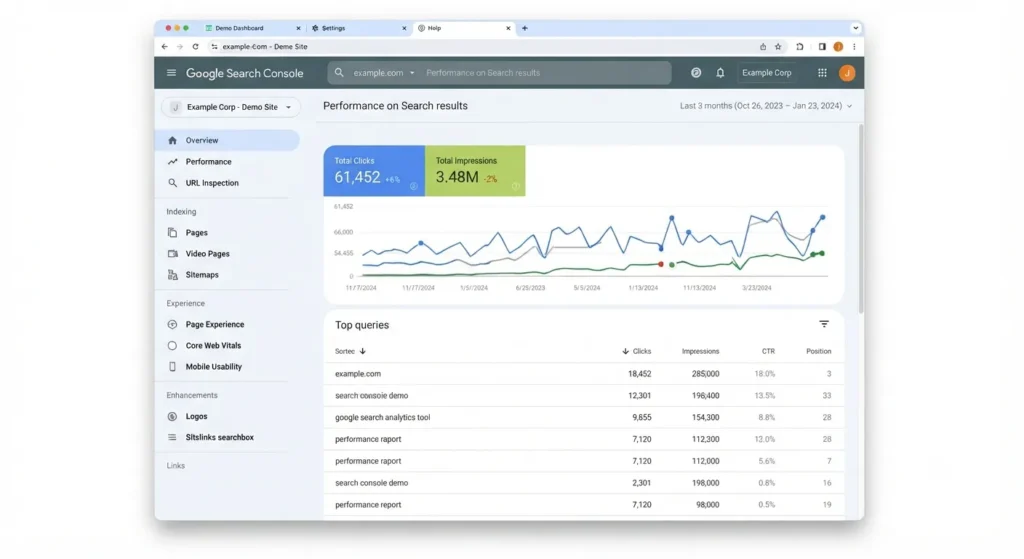
Google Search Console (GSC) is a free SEO tool developed by Google that helps website owners monitor and improve their presence in Google Search. It provides valuable insights into how Google crawls, indexes, and ranks your website.
The platform allows users to identify technical issues, monitor keyword performance, submit sitemaps, and ensure their pages are properly indexed. Because the data comes directly from Google, it is one of the most reliable tools for measuring search performance.
Website owners, SEO professionals, bloggers, developers, and digital marketers all benefit from using Google Search Console as part of their regular SEO workflow.
Key Features
Google Search Console offers several powerful features that help improve website visibility.
- Performance Reports: View clicks, impressions, click-through rate (CTR), and average keyword positions.
- URL Inspection Tool: Check whether individual pages are indexed and identify crawling issues.
- Index Coverage Reports: Monitor indexing errors and discover pages that Google cannot access.
- Sitemap Submission: Submit XML sitemaps to help Google discover new pages.
- Core Web Vitals Report: Analyze page experience based on Google’s performance metrics.
- Mobile Usability Report: Detect mobile-friendly issues affecting user experience.
- Manual Actions & Security Issues: Receive alerts if Google identifies spam, hacking attempts, or manual penalties.
Limitations
Although Google Search Console is an essential SEO tool, it has some limitations.
- It only provides Google Search data.
- Historical data is limited compared to some paid tools.
- It does not include competitor analysis.
- Backlink quality analysis is basic.
- It offers limited keyword research capabilities.
Google Analytics 4 (GA4)
Google Analytics 4 (GA4) is Google’s latest analytics platform for tracking user behavior across websites and mobile apps. Unlike previous versions, GA4 uses an event-based data model, allowing businesses to measure every important user interaction, such as clicks, downloads, video views, and purchases.
For SEO professionals, GA4 helps evaluate how organic visitors interact with a website after arriving from search engines. While it doesn’t provide keyword rankings, it offers valuable insights into engagement, traffic quality, and conversions.
Key Features
Google Analytics 4 includes several powerful features that help businesses understand user behavior and measure website performance.
Event Tracking
GA4 tracks user interactions as events instead of sessions. This includes page views, button clicks, form submissions, video plays, downloads, and purchases. Event-based tracking provides a more detailed understanding of user activity.
User Journey Reports
The platform visualizes how visitors move through your website. You can identify the pages users visit first, where they continue, and where they leave. These insights help improve navigation and user experience.
Engagement Metrics
GA4 measures user engagement through metrics such as:
- Engaged sessions
- Average engagement time
- Engagement rate
- Events per session
These metrics provide a clearer picture of content performance than traditional bounce rate alone.
Audience Insights
Audience reports reveal valuable information about your visitors, including:
- Geographic location
- Device type
- Browser
- Language
- Interests
- Demographics (where available)
These insights help businesses create content that better matches their audience.
Traffic Acquisition Reports
Traffic acquisition reports show where visitors come from, including:
- Organic Search
- Direct
- Paid Search
- Social Media
- Referral Websites
- Email Campaigns
SEO professionals can easily measure how much traffic comes from search engines.
Conversion Tracking
GA4 allows you to define important actions as conversions, such as:
- Newsletter sign-ups
- Contact form submissions
- Product purchases
- Lead generation
Tracking conversions helps measure the business impact of SEO efforts.
Custom Reports
Users can create customized reports and dashboards based on specific business goals, making it easier to monitor key performance indicators (KPIs).
Limitations
Despite its powerful features, GA4 has several limitations.
- The interface has a steep learning curve for beginners.
- Setting up events and conversions requires proper configuration.
- Reports can feel complex compared to Universal Analytics.
- It does not provide keyword ranking data.
- It does not include backlink analysis.
Semrush
Semrush is an all-in-one SEO platform that helps businesses improve their online visibility. It combines SEO, PPC, content marketing, social media management, competitor analysis, and digital marketing research into a single platform.
It is widely used by SEO professionals, agencies, marketers, and enterprises because it provides extensive data for planning, executing, and measuring SEO campaigns.
Key Features
Keyword Research
Semrush offers one of the largest keyword databases available. Users can discover keyword ideas, analyze search volume, evaluate keyword difficulty, and understand search intent.
Competitor Analysis
The platform allows users to study competitors’ websites, keywords, backlinks, and traffic sources. This helps identify opportunities to outperform competing websites.
Site Audit
Semrush performs comprehensive SEO audits by scanning websites for technical issues such as:
- Broken links
- Duplicate content
- Missing metadata
- Crawl errors
- HTTPS issues
- Internal linking problems
Position Tracking
Users can monitor keyword rankings across different locations and devices while tracking changes over time.
Backlink Analytics
Semrush analyzes backlink profiles by identifying referring domains, anchor text, toxic links, and new backlink opportunities.
Content Marketing Toolkit
The Content Toolkit assists with:
- Topic research
- SEO writing
- Content optimization
- Content performance tracking
It helps writers create content that aligns with search engine requirements.
Local SEO
Businesses serving local customers can monitor local rankings, manage listings, and improve visibility in local search results.
AI-Powered SEO Features
Semrush incorporates AI to assist with keyword clustering, content generation, optimization suggestions, and workflow automation.
Limitations
Although Semrush is powerful, it also has some drawbacks.
- Subscription plans can be expensive.
- The free version has limited functionality.
- Beginners may feel overwhelmed by the large amount of data.
- Some traffic and keyword metrics are estimates rather than exact values.
Ahrefs
Ahrefs is a comprehensive SEO research platform that helps businesses improve their search engine visibility. It is especially well known for its industry-leading backlink database and competitive analysis capabilities.
SEO professionals use Ahrefs to research keywords, monitor backlinks, perform technical audits, and discover content opportunities.
Key Features
Site Explorer
Site Explorer provides detailed insights into any website’s:
- Organic traffic
- Ranking keywords
- Top-performing pages
- Referring domains
- Backlink profile
Keywords Explorer
This tool generates keyword ideas while displaying:
- Search volume
- Keyword difficulty
- Traffic potential
- Parent topics
- Click metrics
Rank Tracker
Users can monitor keyword rankings across different countries, devices, and search engines while tracking ranking improvements over time.
Site Audit
Ahrefs scans websites for technical SEO issues and provides recommendations for improving website health.
Content Explorer
Content Explorer helps identify popular content by analyzing backlinks, traffic, publication dates, and social engagement. It is useful for content research and idea generation.
Backlink Checker
One of Ahrefs’ strongest features is its backlink checker, which provides detailed information about:
- Referring domains
- Anchor text
- Link growth
- Lost backlinks
- Broken backlinks
Competitive Analysis
Users can compare websites with competitors to identify keyword gaps, backlink opportunities, and content weaknesses.
Limitations
Ahrefs has several limitations to consider.
- Premium pricing may not suit every budget.
- Free tools offer limited functionality.
- Beginners may need time to learn the platform.
- It has fewer PPC features than Semrush.
SE Ranking
SE Ranking is an affordable SEO platform designed for freelancers, small businesses, startups, and digital agencies. It offers essential SEO features without the higher cost of some enterprise-level platforms.
Its user-friendly interface makes it a good choice for beginners who want professional SEO capabilities.
Key Features
Rank Tracking
SE Ranking tracks keyword rankings across multiple search engines, locations, and devices. Users receive accurate ranking reports and visibility trends.
Keyword Research
The platform helps users discover keywords, analyze search volume, estimate keyword difficulty, and identify related search terms.
Website Audit
SE Ranking performs technical website audits to detect issues affecting crawlability, indexing, page speed, metadata, and overall website health.
Competitor Analysis
Users can compare keyword rankings, backlinks, and traffic performance against competitors.
Backlink Monitoring
The platform tracks backlinks, monitors new and lost links, and identifies potentially harmful backlinks.
Marketing Plan
SE Ranking includes a built-in SEO checklist that guides beginners through important optimization tasks.
White-Label Reporting
Agencies can generate branded SEO reports for clients, making it suitable for professional reporting.
Limitations
SE Ranking also has a few limitations.
- Its keyword database is smaller than Semrush and Ahrefs.
- Some advanced enterprise features are unavailable.
- Historical data is more limited than larger SEO platforms.
Screaming Frog SEO Spider
Screaming Frog SEO Spider is a desktop application that crawls websites to identify technical SEO issues. It mimics how search engine bots explore websites, helping users uncover problems that may affect rankings.
It is widely used by technical SEO professionals for comprehensive website audits.
Key Features
Website Crawling
The software scans every accessible page on a website to identify technical SEO issues and provide a complete overview of site structure.
Broken Link Detection
Screaming Frog quickly finds broken internal and external links so they can be repaired before they affect user experience and SEO.
Duplicate Content Detection
The tool identifies duplicate page titles, duplicate meta descriptions, and duplicate content that may confuse search engines.
Redirect Analysis
Users can detect redirect chains, redirect loops, and unnecessary redirects that slow down crawling.
Metadata Analysis
The software reviews title tags, meta descriptions, heading tags, image alt text, and other important on-page SEO elements.
XML Sitemap Generation
Screaming Frog can generate XML sitemaps that help search engines discover website pages more efficiently.
Canonical Tag Checks
The crawler verifies canonical tags to ensure duplicate pages point to the preferred version.
Limitations
Although highly effective, Screaming Frog has several drawbacks.
- It is desktop software rather than a cloud-based platform.
- Beginners may find its interface technical.
- The free version has a crawl limit.
- It is not designed for keyword research.
Google PageSpeed Insights
Google PageSpeed Insights (PSI) is a free performance testing tool developed by Google. It analyzes the loading speed and overall performance of a web page on both mobile and desktop devices. The tool also measures Core Web Vitals, which are key metrics Google uses to evaluate user experience.
PageSpeed Insights provides a performance score along with detailed recommendations to help website owners improve speed, usability, and technical SEO.
Key Features
Performance Score
PageSpeed Insights assigns a performance score between 0 and 100. A higher score indicates better website performance and a smoother user experience.
Core Web Vitals Analysis
The tool measures Core Web Vitals and highlights areas that need improvement. These metrics help website owners understand how real users experience their pages.
Lab Data
Lab data is collected in a controlled testing environment. It simulates how a page loads and identifies performance issues before users experience them.
Field Data
Field data comes from real users visiting your website. It reflects actual performance across different devices and network conditions.
Optimization Suggestions
PageSpeed Insights provides actionable recommendations, such as:
- Compress images
- Minify CSS and JavaScript
- Reduce unused code
- Enable browser caching
- Improve server response time
- Eliminate render-blocking resources
Mobile and Desktop Testing
The tool separately evaluates mobile and desktop versions of a page, helping businesses optimize the experience for every user.
Core Web Vitals Explained
Core Web Vitals measure three important aspects of page experience.
Largest Contentful Paint (LCP)
LCP measures how long it takes for the largest visible element on a page to load. A faster LCP improves the perceived loading speed and user satisfaction.
Interaction to Next Paint (INP)
INP measures how quickly a page responds to user interactions such as clicks, taps, and keyboard inputs. Lower INP values indicate better responsiveness.
Cumulative Layout Shift (CLS)
CLS measures the visual stability of a page. A low CLS score means elements remain in place while the page loads, reducing accidental clicks and improving usability.
Moz Pro
Moz Pro is an all-in-one SEO software suite that helps businesses improve search visibility through keyword research, website optimization, and link analysis. It is especially known for its Domain Authority (DA) metric, which estimates the strength of a website based on its backlink profile.
Moz Pro is widely used by beginners, SEO professionals, and small businesses because of its intuitive interface and easy-to-understand reports.
Key Features
Keyword Explorer
Keyword Explorer helps users discover keyword opportunities by providing search volume, keyword difficulty, organic CTR, and priority scores.
Rank Tracking
The platform tracks keyword rankings over time, allowing users to monitor SEO performance and identify ranking changes.
Site Crawl
Moz Pro scans websites to detect technical SEO issues such as broken links, duplicate content, missing metadata, and crawl errors.
Link Explorer
Link Explorer analyzes backlink profiles by showing referring domains, anchor text, inbound links, and spam score.
On-Page Optimization
The tool provides recommendations for improving title tags, headings, content structure, and other on-page SEO elements.
Domain Authority
Domain Authority (DA) is Moz’s proprietary metric that predicts how likely a website is to rank in search engine results. Although Google does not use DA as a ranking factor, it is commonly used for comparing websites.
Custom Reports
Users can create customized SEO reports for clients or internal performance tracking.
Limitations
Moz Pro has a few limitations.
- Its database is smaller than those of Semrush and Ahrefs.
- Subscription plans can be expensive for small businesses.
- Some advanced SEO features are limited.
- Data updates are generally slower than some competitors.
Surfer SEO
Surfer SEO is a content optimization platform designed to help writers create search-engine-friendly content. It analyzes the top-ranking pages for a keyword and provides data-driven recommendations to improve content quality and relevance.
The platform also supports AI-assisted content creation, making it easier to produce optimized articles while maintaining quality.
Key Features
Content Editor
The Content Editor provides real-time optimization suggestions while you write. It recommends ideal keyword usage, heading structure, content length, and readability improvements.
SERP Analyzer
SERP Analyzer studies the highest-ranking pages for a target keyword. It identifies common ranking factors and content patterns that can improve your own article.
Content Audit
Content Audit evaluates existing pages and suggests updates to improve rankings, keyword coverage, and overall content quality.
Keyword Suggestions
The platform recommends primary keywords, secondary keywords, and related search terms that help improve topical relevance.
NLP Terms
Surfer SEO suggests Natural Language Processing (NLP) terms that frequently appear in top-ranking content, helping writers create more comprehensive articles.
AI Writing Integration
AI features help generate outlines, headings, and draft content while following SEO best practices. However, human editing remains essential to ensure accuracy and originality.
Content Scoring
Each article receives a content score based on optimization factors such as keyword coverage, structure, readability, and topical depth.
Limitations
Surfer SEO also has some drawbacks.
- Subscription costs may be high for individual users.
- The platform mainly focuses on content SEO.
- AI recommendations should not replace human expertise.
- It requires additional SEO tools for backlink analysis, technical audits, and rank tracking.
SEO Tools Comparison Table
| Tool | Primary Purpose | Best For | Free/Paid | Category |
| Google Search Console | Website indexing and search performance | Beginners and professionals | Free | Technical SEO |
| Google Analytics 4 (GA4) | User behavior and traffic analysis | All websites | Free | Analytics |
| Semrush | All-in-one SEO platform | Agencies and SEO professionals | Paid | All-in-One SEO |
| Ahrefs | Backlink analysis and keyword research | SEO professionals | Paid | Link Building & Research |
| SE Ranking | Rank tracking and website audits | Freelancers and small businesses | Paid | Rank Tracking |
| Screaming Frog SEO Spider | Technical website crawling | Technical SEO professionals | Free/Paid | Technical SEO |
| Google PageSpeed Insights | Website speed and Core Web Vitals | All websites | Free | Performance |
| Moz Pro | Keyword research and website optimization | Small businesses | Paid | All-in-One SEO |
| Surfer SEO | Content optimization | Content marketers | Paid | Content SEO |
Conclusion
SEO tools play a vital role in improving website visibility, increasing organic traffic, and simplifying search engine optimization tasks. From keyword research and backlink analysis to technical SEO audits and content optimization, each tool serves a specific purpose. Understanding these categories allows businesses, marketers, and website owners to choose the right solution based on their goals and budget.
There is no single SEO tool that fits every need. Free platforms like Google Search Console, Google Analytics 4, and Google PageSpeed Insights provide essential insights into website performance and technical health. Paid platforms such as Semrush, Ahrefs, SE Ranking, Moz Pro, Screaming Frog SEO Spider, and Surfer SEO offer advanced features for keyword research, competitor analysis, rank tracking, content optimization, and comprehensive SEO management.
For beginners, starting with Google’s free tools is an excellent way to build a strong SEO foundation. As your website grows and your SEO strategy becomes more advanced, investing in premium SEO marketing tools can help streamline workflows, uncover new opportunities, and achieve better search rankings. By combining the strengths of different tools and performing regular SEO audits, you can make informed decisions, improve user experience, and build long-term success in organic search.

