A Google Business Profile is the free listing that lets businesses control how they appear across Google Search and Google Maps, showing details like address, hours, phone number, photos, and reviews directly in search results. For any business that serves local customers, this profile is often the very first impression a potential customer gets, sometimes even before they visit a website.
Because it appears prominently in both Google Search and Google Maps, a well-optimized profile can significantly increase visibility, while an incomplete or inaccurate one can cause a business to lose out to competitors. This guide walks through everything from creating and verifying a profile to optimizing every section, avoiding common mistakes, and monitoring performance, giving businesses a practical, step-by-step approach to Google Business Profile optimization.
What Is a Google Business Profile?
A Google Business Profile is a free tool that allows eligible businesses to manage how their information appears on Google. It covers essential details such as business name, address, phone number, hours, services, photos, and customer reviews all in one place.
Where Does a Google Business Profile Appear?
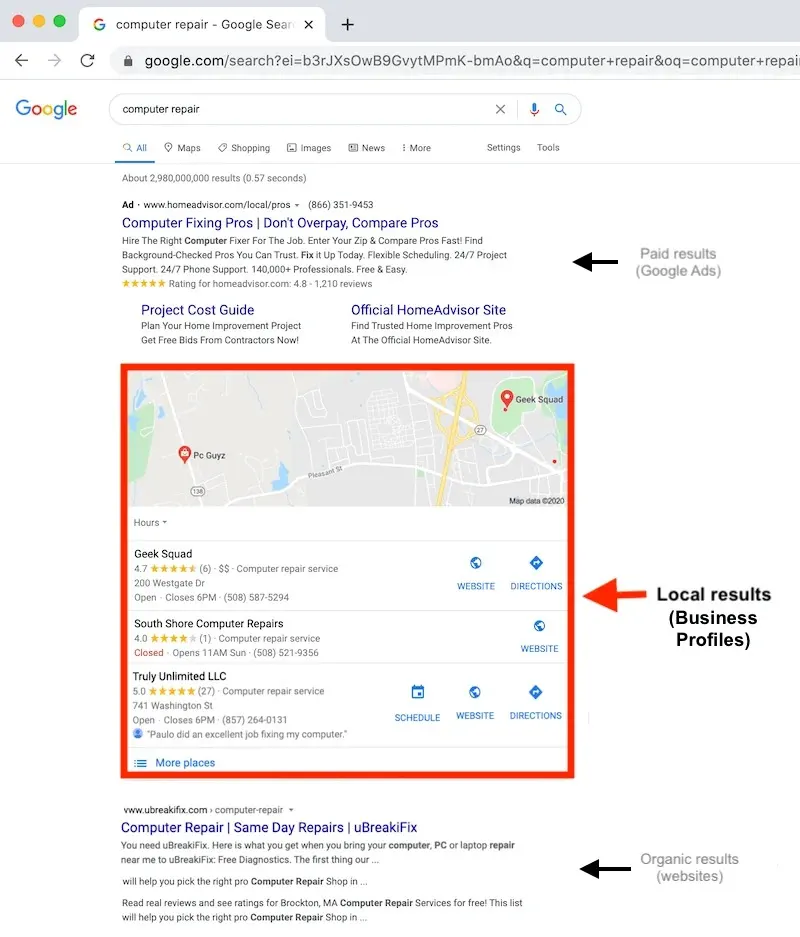
A Google Business Profile can show up in several places, including:
- Google Search
- Google Maps
- Local search results
Why Is Google Business Profile Important for Local SEO?
A properly maintained profile:
- Helps customers discover businesses
- Provides essential business information at a glance
- Supports local search visibility
- Makes it easier for customers to contact or visit the business
How to Create a Google Business Profile
Check Whether Your Business Is Eligible
Not every business qualifies for a Google Business Profile in the same way. Businesses that interact with customers in person at a shop, clinic, or office are handled differently from businesses that operate purely online with no physical customer interaction. It’s worth checking Google’s current eligibility requirements before starting, since these can change.
Find or Add Your Business
Before creating a new listing, search Google to see if a profile already exists:
- If a profile exists, it can be claimed
- If no profile exists, a new one can be created
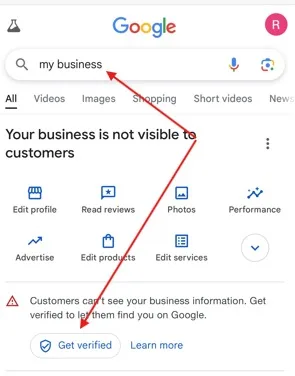
Verify Your Business
Verification confirms that a business is legitimate and connected to the person managing the profile. Google determines which verification method is available for a given business — this can vary, so it’s best to follow the specific instructions Google provides during setup rather than assuming a fixed process.
How to Optimize Your Google Business Profile
Use Your Real Business Name
The business name field should reflect the actual, real-world name of the business nothing more. Adding extra keywords or promotional phrases (“Best Plumber in [City] 24/7 Emergency”) violates Google’s guidelines and can hurt trust and rankings rather than help them.
Choose the Right Primary Category
The primary category tells Google what the business fundamentally is, and it plays a major role in which searches the profile shows up for. It should be selected based on accuracy, not popularity.
Add Relevant Secondary Categories
Additional categories can be added, but only when they genuinely describe services the business offers adding unrelated categories to “cast a wider net” can create confusion rather than more visibility.
Keep Your Address and Service Area Accurate
Businesses with a physical location customers can visit should list their correct address. Service-area businesses ones that travel to customers rather than the other way around can instead define the areas they serve. Either way, the location information shown should never be misleading.
Add the Correct Phone Number and Website
A current, working business phone number and the official website should be listed. This information should also match what’s shown across other important business listings and directories.
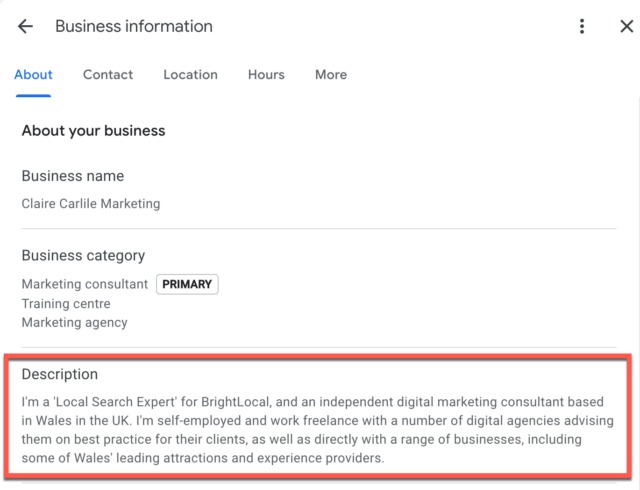
Optimize Your Google Business Profile Description
Write a Clear Business Description
A good business description should cover:
- What the business does
- Main products or services
- Areas served, where relevant
- What makes the business useful to customers
Use Relevant Keywords Naturally
Relevant terms including Google Business Profile SEO language customers actually search for can be worked into the description naturally, but keyword stuffing should be avoided.
Focus on Customers, Not Just Search Engines
The description should ultimately be written for the people reading it, not just for search algorithms. It should clearly communicate what the business actually offers in a way that’s easy to understand.
Add and Optimize Your Business Services and Products
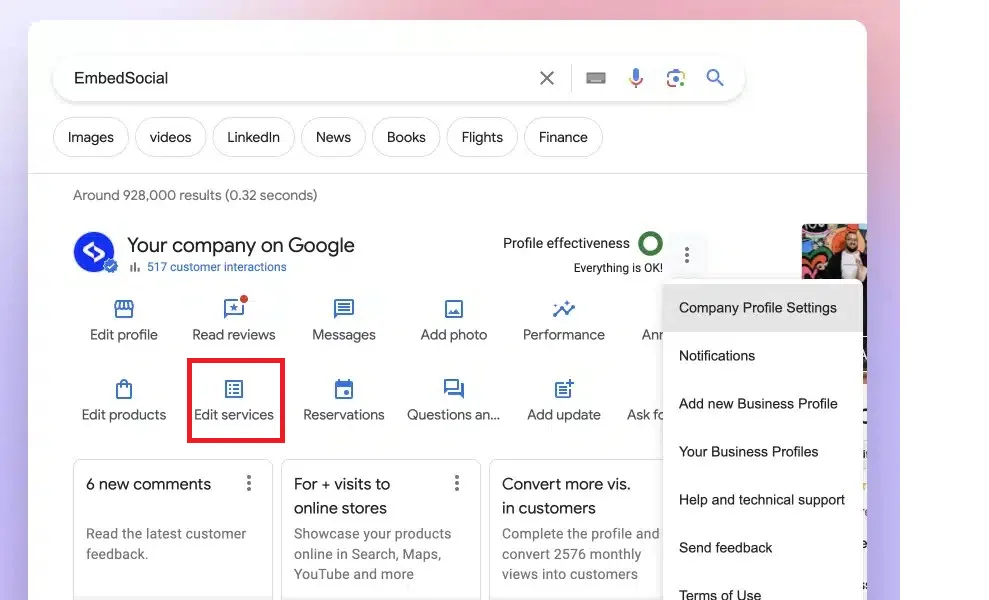
Add Relevant Services
Important services should be listed accurately, with clear names and descriptions that reflect what’s actually offered.
Add Products Where Appropriate
Where relevant, showcasing products with useful, accurate descriptions helps customers understand what’s available before they even visit.
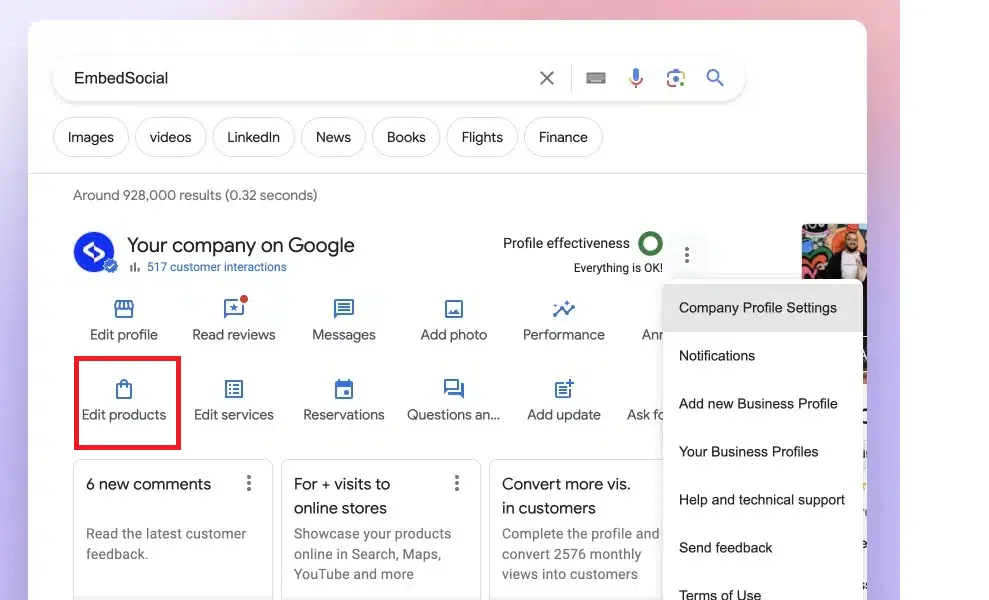
Keep Services and Products Updated
Discontinued offerings should be removed, and information should be updated whenever pricing, services, or products change.
Use High-Quality Photos and Videos
Add Your Logo and Cover Image
A consistent logo and cover image help reinforce branding and make a profile feel trustworthy and professional.
Upload Real Business Photos
Photos should reflect the real business, including:
- Storefront
- Interior
- Team
- Products
- Services
- Work environment
Keep Visual Content Updated
Adding fresh, relevant photos periodically and removing outdated or misleading images keeps a profile accurate and current.
Get and Manage Customer Reviews
Why Reviews Matter for Local Businesses
Reviews act as social proof, and they can meaningfully influence a potential customer’s decision. Review signals are also part of the broader local search ecosystem that affects how a business is perceived.
How to Ask Customers for Reviews
Genuine customers can be asked directly for reviews, and the process should be made as easy as possible for them. Offering incentives in exchange for positive reviews should be avoided, as this violates platform guidelines.
How to Respond to Reviews
Responding professionally matters for both positive and negative feedback:
- Thank customers for positive reviews
- Address negative feedback constructively
- Avoid revealing private customer information in public responses
Never Buy or Fake Reviews
Fake or manipulated reviews are harmful. they mislead customers, violate Google’s policies, and can result in penalties. The focus should always be on collecting authentic customer experiences.
Use Google Business Profile Posts Effectively
What Are Google Business Profile Posts?
Posts are a way for businesses to share timely updates directly on their profile, giving customers a reason to check back and stay informed.
Types of Content to Publish
Useful post types include:
- Business updates
- Offers
- Events
- New products
- New services
- Seasonal announcements
Best Practices for Business Posts
Posts should stay accurate, use clear calls to action where appropriate, include relevant images, and avoid misleading promotional claims.
Manage Your Business Information Regularly
Keep Opening Hours Accurate
Regular hours should always reflect reality, and special or holiday hours should be checked and updated when applicable.
Update Information After Business Changes
Any of the following should be updated promptly after a change:
- Address
- Phone number
- Website
- Services
- Business hours
Maintain NAP Consistency
Keeping Name, Address, and Phone Number (NAP) consistent across a Google Business Profile and other online listings is a core part of local SEO. For a deeper look at why this matters, see our guide, “NAP Consistency Explained: Why It Matters for Local SEO.”
Google Business Profile Ranking Factors
Relevance
Relevance refers to how well a business profile matches what a user is actually searching for.
Distance
Distance factors in both the searcher’s location and how far away the business is located.
Prominence
Prominence relates to how well-known or established a business is, based on a range of signals Google considers.
Profile Completeness and Accuracy
Providing accurate, useful information throughout a profile supports better performance but completing every field is not a guarantee of ranking on its own. Accuracy and relevance matter more than simply filling in blanks.
Common Google Business Profile Optimization Mistakes
Keyword Stuffing the Business Name
Adding keywords that aren’t part of the real-world business name is against guidelines and can backfire.
Choosing the Wrong Business Category
Selecting a category simply because it has high search demand — rather than because it accurately describes the business can hurt relevance and trust.
Using Incorrect Business Information
Common issues include:
- Old phone numbers
- Wrong address
- Outdated hours
- Incorrect website
Ignoring Customer Reviews
Failing to monitor and respond to reviews misses an opportunity to build trust and address concerns.
Using Low-Quality or Irrelevant Photos
Misleading or unrelated images can hurt a profile’s credibility rather than help it.
Creating Duplicate Profiles
Duplicate listings create confusion for both customers and search engines, and should be identified and addressed appropriately.
How to Monitor Your Google Business Profile Performance
Track Customer Actions
Available profile interactions to monitor include:
- Website visits
- Calls
- Direction requests
- Messages, where available
Review Customer Search Insights
Understanding how customers are discovering the business and looking for patterns in that behavior helps inform future decisions.
Use Performance Data to Improve Your Strategy
Performance data can help identify which services get the most attention, guide content improvements based on customer needs, and highlight when profile information needs updating.
Conclusion
Optimizing a Google Business Profile comes down to accuracy, relevance, and regular maintenance from choosing the right categories and writing a clear description, to managing reviews, using posts effectively, and keeping every detail current. None of these steps work in isolation; together, they form one important component of a wider local SEO strategy.
Businesses that treat their Google Business Profile as an ongoing responsibility monitoring performance, responding to customers, and updating information as things change put themselves in a much stronger position to be found by the right customers at the right time.
