Google Analytics 4, or GA4, is one of the most useful tools for understanding website and app performance. It helps marketers see where visitors come from, what they do, and which actions matter most.
For digital marketing beginners, GA4 may look complicated at first. However, its core concepts are easier to understand once you learn how events, users, reports, and key events work.
This Google Analytics for beginners guide explains GA4 in simple terms. You will learn how GA4 works, how event tracking works, how to analyze reports, and how to use GA4 for SEO and digital marketing.
What Is Google Analytics 4?
Google Analytics 4 is Google’s modern analytics platform for measuring user interactions across websites and apps.
Unlike older analytics systems, GA4 focuses heavily on events and user interactions. An event can represent almost any meaningful action, such as viewing a page, clicking a button, downloading a file, or completing a purchase.
GA4 helps businesses answer questions such as:
- How many users visit my website?
- Where do visitors come from?
- Which pages get the most engagement?
- What actions do users take?
- Which marketing channels generate results?
- Which users become customers?
Therefore, GA4 is useful for marketers, SEO professionals, bloggers, website owners, and business teams.
How GA4 Is Different From Universal Analytics
GA4 introduced a different approach to analytics compared with Universal Analytics.
The major difference is the event-based data model. Instead of relying heavily on sessions and pageviews, GA4 collects user interactions as events.
GA4 also supports measurement across websites and apps. This makes it more suitable for understanding users across different digital experiences.
In simple terms:
Universal Analytics: More session and pageview focused.
GA4: More user and event focused.
This change gives marketers a more flexible way to understand the complete user journey.
Why GA4 Is Important for Digital Marketing
GA4 provides valuable data for digital marketing decisions.
You can use it to analyze:
- Website traffic
- User engagement
- Traffic sources
- Content performance
- User journeys
- Key events
- Marketing performance
For example, an SEO specialist can use GA4 to identify which landing pages attract organic visitors and which pages contribute to important business actions.
Core Concepts of GA4
Before learning how to use Google Analytics 4, beginners should understand a few important concepts.
Event-Based Data Model
GA4 primarily uses events to measure user interactions.
For example, when someone visits a page, clicks a button, or downloads a PDF, GA4 can record that interaction as an event.
An event can also contain event parameters. These parameters provide additional information about the interaction.
For example:
Event: file_download
Parameters: File name, file type, link URL
This structure allows marketers to collect more detailed information about user behavior. Google also explains that event parameters provide additional details about actions measured through events.
Holistic User Journey
GA4 helps marketers understand how users interact with a website over time.
A visitor might first discover a website through Google Search. Later, they may return through social media and eventually submit a form.
GA4 can help analyze these interactions and understand the broader customer journey.
Cross-Platform Analysis
GA4 can measure data from websites and apps.
This is useful for businesses that have multiple digital platforms. Instead of looking at every platform separately, marketers can use GA4 to create a broader view of user activity.
User-Centric Tracking
GA4 focuses strongly on users and their interactions.
This allows marketers to move beyond simple traffic numbers and ask more useful questions.
For example:
Instead of: How many pageviews did we receive?
Ask: What did users do after viewing the page?
This shift makes analytics more useful for decision-making.
How to Use GA4 for SEO
GA4 is not an SEO tool in the same way as Google Search Console. However, it can provide valuable information about what happens after users arrive on your website.
SEO professionals can use GA4 to analyze:
Organic Traffic
You can examine how much traffic comes from organic search and how users behave after arriving.
Landing Page Performance
Identify pages that receive organic visitors and evaluate their engagement.
A page may receive thousands of visitors but generate very few meaningful actions. Another page may receive less traffic but generate more leads.
User Engagement
GA4 can help you understand whether organic visitors actually interact with your website.
You can analyze events, engagement metrics, and user journeys to identify stronger-performing content.
Organic Key Events
You can evaluate whether organic visitors complete important actions such as:
- Contact form submissions
- Sign-ups
- Purchases
- Demo requests
- Lead generation
Search Console Data
Connecting Google Search Console with GA4 can help you combine search performance insights with website behavior.
Search Console can help answer:
How are people finding my website?
GA4 can help answer:
What do they do after arriving?
Together, these tools provide a stronger SEO analysis workflow.
GA4 Event Tracking
Event tracking is one of the most important concepts in any Google Analytics 4 beginner guide.
What Are Events in GA4?
Events represent user interactions with your website or app.
Common examples include:
- Page views
- Button clicks
- Form submissions
- Video engagement
- File downloads
- Purchases
- Sign-ups
Think of an event as a record of something a user did.
For example:
User clicks “Contact Us” → GA4 records an event.
This allows marketers to measure actions instead of only counting visitors.
Automatically Collected Events
GA4 can automatically collect certain events after Analytics is implemented.
Depending on the platform and configuration, examples can include page views and other automatically collected interactions.
GA4 also provides Enhanced Measurement features that can capture additional website interactions without requiring manual event configuration for every action.
Enhanced Measurement
Enhanced Measurement makes GA4 installation easier for beginners.
It can help measure interactions such as:
- Scrolls
- Outbound clicks
- Site search
- Video engagement
- File downloads
Before relying on these events, always check that the required measurement feature is enabled and that the data is being collected correctly.
Recommended Events
Recommended events are event names suggested by Google for common user actions.
They are useful when your website has actions that fit Google’s recommended event structure.
Examples can include:
- Sign-up
- Login
- Purchase
- Add to cart
- Begin checkout
Using appropriate recommended events can make your analytics implementation more consistent.
Custom Events and Parameters
Sometimes standard or recommended events are not enough.
You may need to create a custom event for a specific business interaction.
For example:
pricing_button_click
You can also send parameters with the event to provide additional information.
However, avoid creating custom tracking when an existing predefined event or dimension already meets your needs.
Registering Custom Dimensions
Custom dimensions help you analyze additional descriptive information collected from your website or app.
For example, you might collect a custom parameter such as:
membership_type = premium
You can then register it as an appropriate custom dimension and use it for analysis.
Google recommends using predefined dimensions whenever possible instead of creating unnecessary custom dimensions.
Key Events and Conversions in GA4
One important terminology change beginners should know is key events.
Older GA4 resources often use the word “conversions.” Google Analytics now uses key events to describe important business actions measured in Analytics.
Defining Meaningful Actions
Not every event is equally important.
A business might consider these actions important:
- Purchase
- Lead submission
- Sign-up
- Contact form submission
- Demo request
These actions can be identified as key events because they directly support business goals.
Predefined Key Events
Some important business actions can be measured through events such as purchases, sign-ups, and lead-generation activities.
The important point is to identify the event that represents the business action and then mark it as a key event.
Marking Events as Key Events
Any collected event that represents an important business action can be marked as a key event.
The basic process is:
Event → Identify important action → Mark as key event → Analyze results
Google states that any collected event can become a key event. Key events can then be analyzed in reports and explorations to understand marketing performance.
Creating Events From the GA4 Interface
GA4 also allows users with the required permissions to create certain events directly within the interface.
This can be useful when you need to define a new event based on existing event data without immediately changing website code.
For more complex tracking requirements, tools such as Google Tag Manager may be useful.
Testing and Debugging GA4
Installing GA4 is only the beginning.
You should test your implementation before making important marketing decisions from the data.
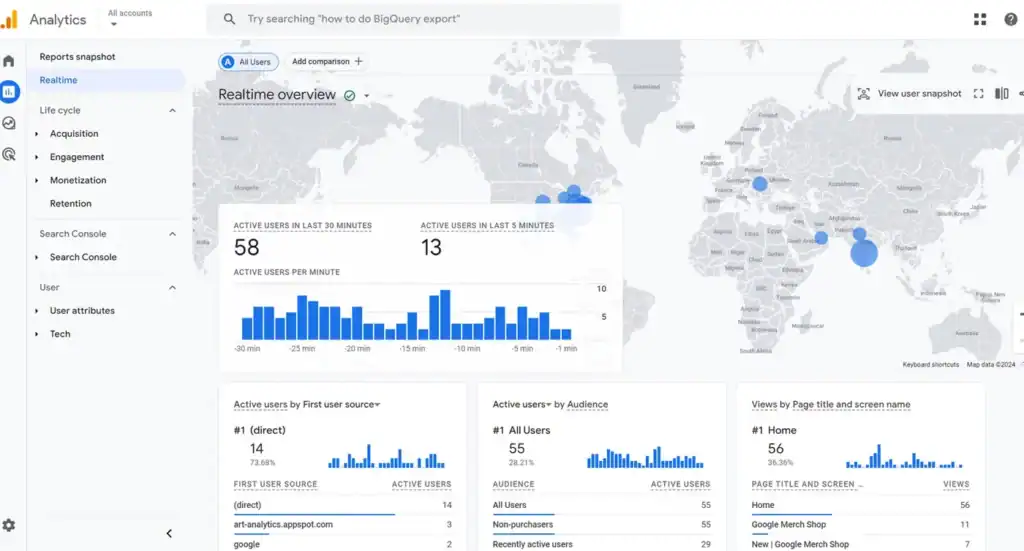
Realtime Reports
The Realtime report allows you to check recent activity on your website.
For example, you can visit your website and perform an action. Then you can check whether the corresponding activity appears in GA4.
DebugView
DebugView is useful for inspecting events during implementation and troubleshooting.
It can help you understand whether individual events are being received and whether the event information looks correct.
Google Tag Assistant
Google Tag Assistant can help verify Google tags and troubleshoot tagging issues.
It is especially useful when GA4 is implemented through Google Tag Manager or Google tags.
Troubleshooting GA4 Installation
Common GA4 problems include:
- Tracking code is missing
- Incorrect Measurement ID
- Events are not appearing
- Duplicate tracking
- Internal traffic is included
- Data processing is delayed
Always test your implementation before depending on the collected data.
GA4 Reporting and Analysis
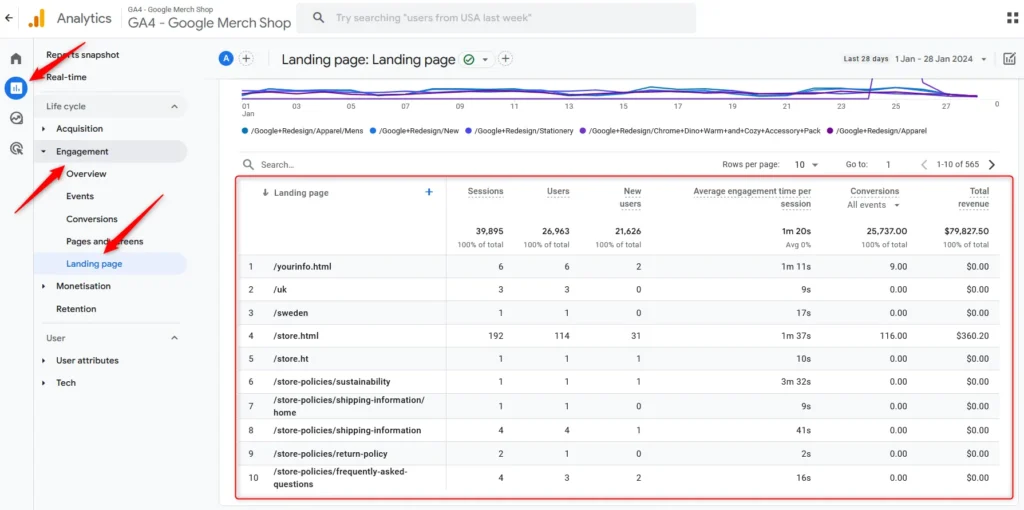
GA4 reports help marketers understand website and app performance.
A detailed report can provide deeper analysis through charts and tables, while overview reports provide a higher-level summary.
Acquisition Reports
Acquisition reports help you understand where users come from.
You can analyze traffic from sources such as:
- Organic search
- Paid search
- Referral traffic
- Direct traffic
- Social channels
This information helps marketers evaluate different acquisition channels.
Engagement Reports
Engagement reports help you understand what users do after arriving.
You can analyze:
- Pages and screens
- Events
- User engagement
- Key events
For content marketers, these reports can help identify which pages deserve further optimization.
Retention Reports
Retention analysis helps businesses understand whether users return after their initial interaction.
You can examine:
- New users
- Returning users
- Repeat behavior
- User retention
This is especially useful for businesses that depend on repeat visitors or customers.
Demographics and Technology
GA4 can also provide information about user technology and, where available and appropriate, demographic data.
Technology information can include:
- Devices
- Browsers
- Operating systems
Use demographic information responsibly and remember that privacy controls and data thresholds can affect what is available.
GA4 Administration
The Admin section controls important parts of your Analytics property.
It is where administrators and authorized users can manage settings, data collection, access, and other configurations.
User Access and Roles
GA4 uses different access levels to control what users can view or manage.
Common roles include:
- Viewer: Can view data and reports.
- Analyst: Has additional analysis capabilities.
- Marketer: Can work with marketing-related features.
- Editor: Can make broader configuration changes.
- Administrator: Has the highest level of control.
The exact permissions available depend on the account or property level and the specific permission being used.
Always give team members only the access they need.
Data Privacy and Consent Mode
Privacy is an important part of modern analytics.
Businesses should consider:
- What data is being collected
- Why it is being collected
- Whether user consent is required
- How consent preferences are respected
- How analytics data is stored and used
Consent Mode helps Google tags adjust their behavior based on users’ consent choices.
Privacy regulations differ by location, so businesses should implement analytics and consent mechanisms according to applicable laws and professional legal guidance.
Conclusion
Google Analytics 4 may seem complicated when you first open it. However, the basic concepts are straightforward.
Start by understanding users, events, parameters, key events, reports, and explorations.Then learn how to use GA4 for SEO, content analysis, conversion tracking, and marketing measurement.The most important lesson is this:Do not collect data just because you can. Collect data that helps you make better decisions.
For beginners, a simple GA4 workflow is enough to start:
Set up GA4 → Test tracking → Understand events → Define key events → Analyze reports → Explore user journeys → Improve marketing performance
With regular practice, GA4 can become one of the most valuable tools in your digital marketing toolkit.

