Content creation is not easy. You need to research topics, write good content, design graphics, edit videos, and track results. Doing all this by hand takes a lot of time and effort. This is why creators need the right tools.
Whether you are a blogger in Kerala writing about local tourism, a small business owner in Kochi promoting your products, or a freelancer working with global clients, the right tools can save you hours every week. They help you work faster, produce better content, and grow your audience with less stress.
In this guide, we will walk through the best tools for every stage of content creation. We will keep things simple so that even beginners can follow along and build their own tool stack.
What Are Content Creation Tools?
Content creation tools are software platforms that help you handle different parts of the content process. They help you:
• Plan your content ideas
• Research keywords and topics
• Write articles and posts
• Design graphics and images
• Edit videos
• Schedule and publish posts
• Analyze how your content performs
Instead of doing everything manually, these tools automate the boring parts so you can focus on creativity and strategy.
Why Content Creation Tools Matter
They Save Time
Good tools automate repetitive tasks. Instead of manually checking grammar or resizing images, a tool does it for you in seconds.
They Improve Quality
Tools like grammar checkers and design apps help you create professional-looking content, even if you are not a trained writer or designer.
They Increase Productivity
Managing content across multiple platforms is hard. Tools let you handle blogs, social media, and videos without feeling overwhelmed.
They Support Team Collaboration
If you work with a team, tools like Notion and Trello let everyone stay on the same page. This is useful for agencies and businesses across Kerala and beyond that manage content teams remotely.
They Improve Performance Tracking
You cannot improve what you do not measure. Analytics tools show you what is working and what needs to change.
Stages of Content Creation and the Best Tools for Each
1. Content Research Tools
Before you write anything, you need to know what your audience wants to read. These tools help you find trending topics and common questions.
• Google Trends – See what topics are gaining popularity in your region or country.
• AnswerThePublic – Find real questions people search for online.
• BuzzSumo – Discover content that performs well in your niche.
• Reddit – Explore honest discussions and opinions from real users.
• Quora – Find common questions your audience is asking.
These tools help with topic research, trend analysis, and understanding what your audience actually cares about.
2. Writing Tools
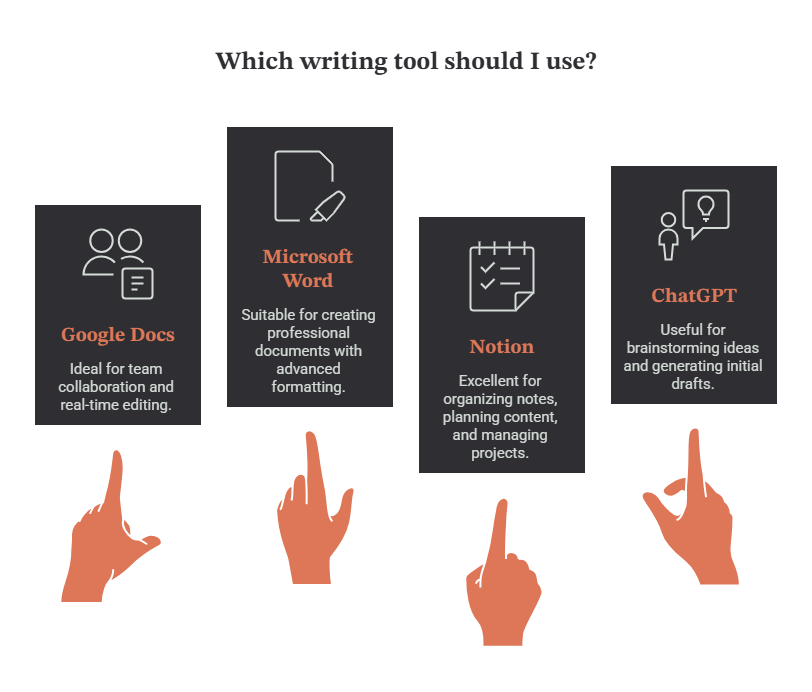
Once you know your topic, it is time to write. These tools make writing and organizing content easier.
3. SEO Tools
SEO tools help your content reach more people through search engines. This matters whether you are writing for a global audience or targeting local searches, such as content about events or businesses in Kerala.
| Tool | Use Case |
| Google Keyword Planner | Keyword research |
| Ahrefs | SEO analysis |
| Semrush | Competitor research |
| Google Search Console | Website performance |
| Google Trends | Trend discovery |
These tools help you with keyword research, understanding search intent, studying competitors, and finding ranking opportunities.
4. Grammar and Editing Tools
Clean, error-free writing builds trust with your readers.
| Tool | Use Case |
| Grammarly | Grammar checking |
| Hemingway Editor | Improve readability |
| LanguageTool | Writing improvements |
These tools check grammar, improve sentence clarity, and make your writing easier to read.
5. Graphic Design Tools
Visuals grab attention and make your content more shareable.
| Tool | Use Case |
| Canva | Social media designs |
| Adobe Express | Quick graphics |
| Figma | Design collaboration |
Use these tools for social media posts, infographics, presentations, and blog images.
6. Image Resources
You always need good images. These platforms offer free, high-quality photos.
| Tool | Use Case |
| Unsplash | Free stock photos |
| Pexels | Videos and images |
| Pixabay | Media resources |
These give you high-quality visuals that you can use commercially on your website or social pages.
7. Video Editing Tools
Video content is growing fast, from YouTube tutorials to Instagram Reels.
| Tool | Use Case |
| CapCut | Short-form video editing |
| DaVinci Resolve | Professional editing |
| Adobe Premiere Pro | Advanced editing |
| Filmora | Beginner-friendly editing |
These tools cover Reels, Shorts, YouTube videos, and tutorials, whether you are a beginner or a professional editor.
8. AI Content Tools
AI tools speed up almost every part of content creation.
| Tool | Use Case |
| ChatGPT | Writing and ideas |
| Claude | Long-form content |
| Gemini | Research assistance |
| Canva AI | Design support |
AI helps with brainstorming, outlines, drafts, image creation, and content optimization. But remember: AI should support your creativity, not replace it. Always review and personalize your final content before publishing.
9. Content Planning Tools
Staying organized is key to consistent content. Before choosing a planning tool, it is important to have a clear content strategy and publishing schedule. Learn How to Create a Content Plan to organize your topics, content goals, publishing schedule, and content workflow.
| Tool | Use Case |
| Trello | Content workflows |
| Asana | Project management |
| Notion | Content calendars |
| Airtable | Editorial planning |
These tools help with task management, content scheduling, and team collaboration.
10. Social Media Management Tools
Managing multiple social platforms is easier with the right tool.
| Tool | Use Case |
| Buffer | Scheduling |
| Hootsuite | Multi-platform management |
| Metricool | Analytics |
| Sprout Social | Social management |
Use these to schedule posts, monitor engagement, and track your results across platforms.
11. Analytics Tools
You need data to know if your content is working.
| Tool | Use Case |
| Google Analytics 4 | Website tracking |
| Google Search Console | SEO data |
| Meta Business Suite | Social insights |
| YouTube Analytics | Video performance |
Track metrics like traffic, engagement, clicks, and conversions to understand your audience better.
Best Content Creation Tools by Category
| Category | Recommended Tool |
| Writing | Google Docs |
| SEO | Semrush |
| Grammar | Grammarly |
| Design | Canva |
| Images | Unsplash |
| Video | CapCut |
| AI | ChatGPT |
| Planning | Notion |
| Scheduling | Buffer |
| Analytics | Google Analytics 4 |
Tool Stack for Beginners
If you are just starting out, do not try to use every tool at once. Start with this simple setup:
• Writing → Google Docs
• SEO → Google Keyword Planner
• Grammar → Grammarly
• Design → Canva
• Video → CapCut
• AI → ChatGPT
• Analytics → Google Analytics
Start simple. Add more tools only when your content needs grow.
Common Mistakes When Using Content Tools
Avoid these mistakes to get the most out of your tools:
• Using too many tools at once, which creates confusion
• Depending only on AI without adding your own voice
• Ignoring analytics and not learning from your data
• Skipping proofreading before publishing
• Creating content without a clear strategy
• Paying for premium tools before understanding what you actually need
Tips for Choosing the Right Tools
Follow these tips before you invest time or money in a tool:
• Define your content goals first
• Start with free tools before upgrading
• Check if the tool integrates with your other platforms
• Consider how easy the tool is to use
• Compare pricing plans carefully
• Choose tools that fit your workflow, not the other way around
Content Creation Workflow Example
Here is a simple workflow you can follow from start to finish:
1. Research – Use Google Trends and Keyword Planner to find topics.
2. Write – Draft your content using Google Docs and ChatGPT.
3. Edit – Polish your writing with Grammarly.
4. Design – Create visuals using Canva.
5. Video – Edit short clips using CapCut.
6. Publish – Post your content using WordPress and Buffer.
7. Measure – Track results with Google Analytics and Search Console.
Conclusion
Content creation tools help you improve productivity, quality, and consistency. They take care of repetitive tasks so you can focus on creating content that connects with your audience, whether you are writing for readers in Kerala or building an audience across the world.
Start simple. Begin with easy-to-use tools like Google Docs, Canva, Grammarly, ChatGPT, and Google Analytics. As your content needs grow, you can add more advanced platforms to your workflow. The goal is not to use every tool available, but to find the ones that truly help you create better content, faster.

