What Is Agentic Browsing
A couple of months ago, I was teaching a Technical SEO & GEO class to a group of new SEO professionals. While explaining Google PageSpeed Insights and walking through a Lighthouse report, I noticed a new section called Agentic Browsing. It wasn’t something I had seen before, and it immediately caught my attention.
As a marketer, I’ve learned that our industry changes constantly. If we stop learning, we fall behind. So, after the class, I decided to dig deeper. I read the official Chrome Developer documentation, explored the Lighthouse implementation, and reviewed insights shared by the technical SEO community to understand why Google had introduced this new audit.
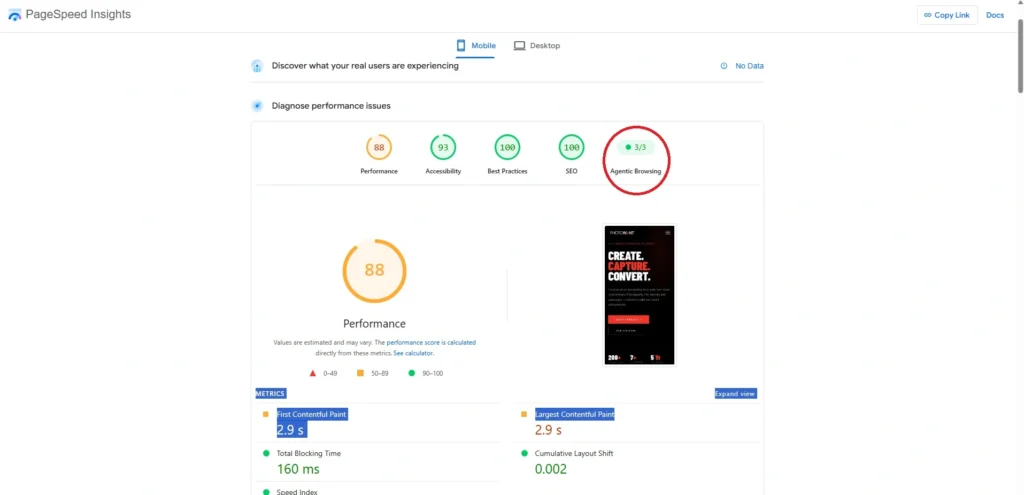
What I discovered was fascinating. Agentic Browsing is an experimental Lighthouse feature designed to evaluate how well a website supports AI agents that perform tasks on behalf of users, rather than simply serving traditional search engine crawlers. As AI becomes a bigger part of how people interact with the web, understanding this concept is becoming increasingly important for developers, marketers, and SEO professionals.
Why Google Introduced Agentic Browsing in Lighthouse 13.3
Google Lighthouse has traditionally measured how well websites perform for human users. It evaluates performance, accessibility, SEO, and best practices to help developers build faster and more usable websites. With the rise of AI agents that can browse, understand, and interact with websites, Google has started expanding Lighthouse to evaluate whether websites are also prepared for these new types of visitors.
The Agentic Browsing audit was introduced as an experimental feature in Lighthouse 13.3. Instead of measuring page speed or user experience alone, it checks whether an AI agent can understand a webpage’s structure, interact with its interface, and complete tasks successfully. The audit currently focuses on areas such as the accessibility tree, layout stability, llms.txt, and WebMCP support, which help AI agents navigate websites more effectively.
This does not mean Agentic Browsing is a new Google Search ranking factor. Instead, it represents Google’s early effort to establish standards for AI-ready websites. As AI assistants become more capable of completing tasks on behalf of users, websites that follow these standards may provide a better experience for both people and AI agents.
Google PageSpeed Insights (PSI) uses Lighthouse to analyze a webpage and generate its audit reports. Traditionally, Lighthouse has focused on website quality by evaluating metrics such as First Contentful Paint (FCP), Largest Contentful Paint (LCP), Total Blocking Time (TBT), Cumulative Layout Shift (CLS), and Speed Index (SI). Together, these metrics contribute to the overall Lighthouse performance score out of 100.
The new Agentic Browsing section expands this evaluation beyond performance. Instead of measuring loading speed or visual stability, it assesses whether an AI agent can understand a webpage, interact with its interface, and complete tasks successfully. These checks are reported separately from the traditional Lighthouse performance score.
At the time of writing, Agentic Browsing remains an experimental Lighthouse audit. Its results are displayed as a pass ratio rather than a numerical score, and Google may refine these checks as AI technologies and web standards continue to evolve.
Understanding Agentic Browsing
How AI Agents Interact With Websites
Traditional search engine crawlers are designed to discover, crawl, and index web pages so they can appear in search results. AI agents work differently. Instead of simply retrieving information, they understand user goals, make decisions, interact with web interfaces, and complete multi-step tasks on behalf of users. This represents a significant shift from information retrieval to task completion.
Imagine asking an AI assistant, “Book the cheapest direct flight from Kochi to Dubai next Friday.” Rather than returning a list of search results, the AI agent may visit multiple airline and travel websites, compare fares, apply filters, choose the best option based on your preferences, fill in passenger details, and take you to the final booking page. To complete this workflow successfully, the agent must understand every step of the website just as a human user would.
This is where semantic HTML becomes important. Elements such as properly structured headings, descriptive buttons, labelled form fields, navigation menus, and accessible tables help AI agents understand the purpose of each part of a webpage. Combined with accessibility information, stable page layouts, and machine-readable content, semantic HTML enables AI agents to navigate websites accurately and interact with them reliably.
AI agents like OpenAI Operator, Google Project Mariner, and Perplexity Assistant continue to evolve, websites will increasingly need to support both human visitors and AI agents. Google’s Agentic Browsing audit in Lighthouse and PageSpeed Insights is an early step toward measuring how well websites are prepared for this new way of interacting with the web.
Google PageSpeed Insights Agentic Browsing Checks
Accessibility Tree
The Accessibility Tree is one of the most important checks in the Agentic Browsing audit. It represents a simplified, machine-readable version of a webpage that browsers expose to assistive technologies and AI agents. Instead of interpreting the visual layout of a page, AI agents rely on this structured representation to understand the purpose of headings, buttons, forms, navigation menus, links, and other interactive elements.
A well-structured Accessibility Tree is built using semantic HTML, meaningful ARIA roles, accessible names, and properly labelled form controls. When these elements are implemented correctly, AI agents can understand what each component does and interact with it confidently. For example, a button labelled “Book Flight” is far more meaningful than a generic button labelled “Click Here”, allowing both assistive technologies and AI agents to predict the outcome of the interaction.
Because AI agents perform tasks rather than simply reading content, the Accessibility Tree has become a critical part of AI-ready websites. Google’s Lighthouse evaluates whether your website provides enough semantic and accessibility information for these agents to navigate and complete workflows successfully. Improving this audit not only prepares your website for Agentic Browsing but also enhances accessibility for users who rely on assistive technologies.
The easiest way to improve your Accessibility Tree is to build webpages with semantic HTML instead of relying on generic elements. HTML elements such as <header>, <nav>, <main>, <section>, <article>, <button>, and <form> clearly describe the purpose of content, while descriptive buttons, properly associated <label> elements, meaningful alt text, and well-implemented ARIA attributes help both AI agents and assistive technologies understand and interact with your website correctly.
Layout Stability
Layout Stability measures whether a webpage remains visually stable while it loads and users interact with it. In traditional SEO, this is measured using Cumulative Layout Shift (CLS). For Agentic Browsing, layout stability becomes even more important because AI agents depend on a predictable interface to complete tasks accurately.
Imagine an AI agent trying to book the cheapest flight from Kochi to Dubai. It identifies the “Search Flights” button and prepares to click it. Just before the interaction, an advertisement loads, pushing the button to a different position. The AI agent may now click the wrong element, causing the workflow to fail. The same issue can occur when booking hotels, completing checkout forms, or submitting online applications.
A stable layout benefits both users and AI agents. Google’s Lighthouse checks whether important page elements remain in predictable positions while the page loads. Frequent layout shifts can interrupt user interactions and reduce an AI agent’s ability to complete tasks successfully.
The best way to improve Layout Stability is to minimize Cumulative Layout Shift (CLS). Reserve space for images, advertisements, embedded content, and dynamically loaded elements before they appear. Always specify image dimensions, avoid inserting new content above existing elements, and optimize fonts and third-party scripts that may cause unexpected movement. Keeping your CLS score below 0.1 creates a more reliable experience for both human visitors and autonomous AI agents
llms.txt Validation
The llms.txt file is a proposed standard that helps Large Language Models (LLMs) and AI agents understand the most important parts of a website. Similar to how a robots.txt file provides crawling instructions for search engine bots, an llms.txt file provides a structured, human-readable summary of key website content. It is typically placed in the website’s root directory as https://example.com/llms.txt.
Unlike robots.txt, the purpose of llms.txt is not to allow or block access. Instead, it acts as a guide that points AI agents to the most valuable resources on a website. A typical llms.txt file is written in Markdown and may include a brief description of the website, links to important pages, product documentation, API references, knowledge base articles, and other content that helps AI systems understand the site’s structure more efficiently.
Although llms.txt is still an emerging standard, Google Lighthouse has started validating its presence as part of the experimental Agentic Browsing audit. While implementing an llms.txt file is currently optional, it reflects the growing importance of making websites easier for AI agents to understand and navigate.
If you decide to implement llms.txt, keep it simple and focused. Include only the most important resources that an AI assistant would need, such as product documentation, help articles, API references, or knowledge base pages. Organize the content clearly using Markdown headings and keep the file updated whenever your website structure changes.
WebMCP
WebMCP is an experimental protocol that allows websites to expose their capabilities to AI agents in a structured and standardized way. Instead of requiring an AI agent to understand every webpage visually, WebMCP enables a website to describe the tools, actions, and workflows it supports. This makes it easier for AI agents to discover what they can do on a website and interact with it more reliably.
For example, consider an airline website. Without WebMCP, an AI agent has to identify search forms, departure and destination fields, date pickers, and booking buttons by analyzing the webpage. With WebMCP, the website can expose these capabilities directly, allowing the AI agent to understand that it can search flights, check fares, or begin a booking process without relying entirely on the visual interface. This reduces ambiguity and makes automated interactions more dependable.
At the time of writing, WebMCP is still experimental and is not widely implemented across websites. Google Lighthouse includes it as part of the Agentic Browsing audit to encourage developers to explore emerging standards for AI interactions.
Although most websites do not need to implement WebMCP today, it is worth monitoring as the standard evolves. Developers exploring WebMCP can use the WebMCP Validator to validate WebMCP implementations and support more reliable interactions between websites and AI agents.. As AI agents become more common, protocols like WebMCP may become an important part of how websites communicate with autonomous systems
Why Agentic Browsing Matters
Agentic Browsing is more than another Lighthouse experiment. It reflects how websites may be evaluated as AI assistants become capable of browsing, understanding, and completing tasks on behalf of users. As this shift continues, websites will need to serve both human visitors and autonomous AI agents.
The practices encouraged by Agentic Browsing—such as semantic HTML, accessibility, stable layouts, and machine-readable content—are already considered good web development standards. Even if these audits are experimental today, implementing these best practices improves accessibility, user experience, and the overall quality of a website.
For SEO professionals and marketers, Agentic Browsing is also an opportunity to prepare for the future. Just as mobile-first indexing and Core Web Vitals changed how websites were built, AI agents may influence how users discover, interact with, and complete tasks on websites. Building AI-ready websites today helps ensure they remain useful as web interactions continue to evolve.
Current Status of Google PageSpeed Insights Agentic Browsing
Although Agentic Browsing is now visible in Google PageSpeed Insights through Lighthouse 13.3, it is still an experimental feature. Google is actively refining the audit, and the checks, scoring methodology, and supported standards may change as AI technologies and web standards continue to evolve.
Unlike the traditional Lighthouse Performance category, which produces a score out of 100 based on metrics such as FCP, LCP, Speed Index, Total Blocking Time (TBT), and CLS, the Agentic Browsing section reports a pass ratio. It indicates how many of the available AI-readiness checks your website passes instead of assigning a weighted performance score.
Most importantly, Google has not stated that Agentic Browsing is a direct search ranking factor. Instead, it should be viewed as an early indicator of how well a website supports autonomous AI agents. As AI assistants become more capable of interacting with websites, these audits may play a larger role in encouraging developers to build websites that are accessible, structured, and ready for AI-driven interactions.
